Question

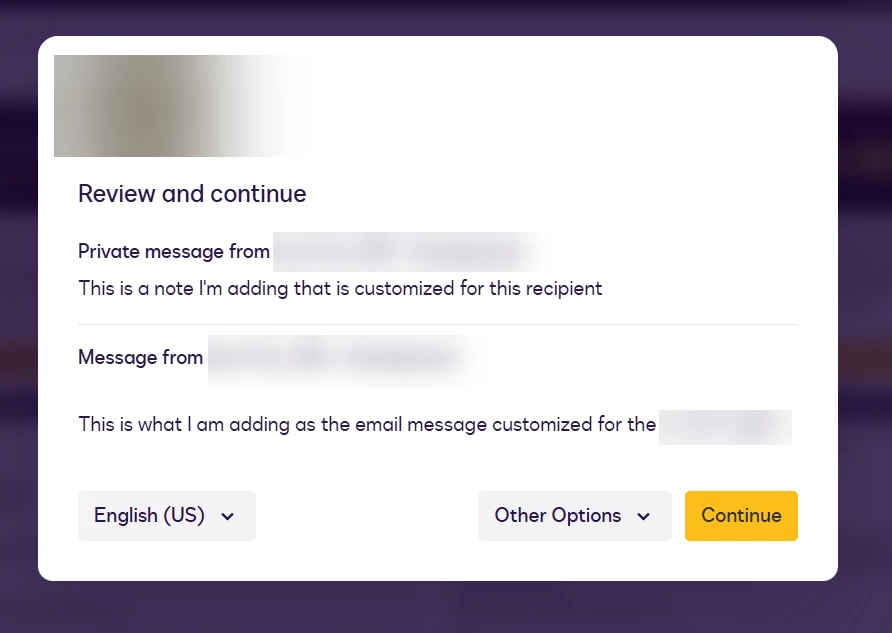
Is it possible to stop showing the email message in ERSD modal?

  • June 15, 2026
  • 1 reply
  • 24 views

Forum|alt.badge.img

I am using the createEnvelope endpoint using the structure envelopedefinition > compositetemplates > inlinetemplates > recipients > signers. For each of my signers, I want to customize the email body/message e.g. “Hi [Recipient1_Name], ...” but I don’t want this message to appear on the ERSD modal (see screenshot below) that pops up once they have completed two-factor authentication. 

I tried using the note string, but it has the same effect. Any thoughts that don’t mean updating this globally? 


1 reply

Forum|alt.badge.img+5

You can do this at an envelope level by using the following property: useDisclosure

When true, the disclosure is shown to recipients in accordance with the account's Electronic Record and Signature Disclosure frequency setting. When false, the Electronic Record and Signature Disclosure is not shown to any envelope recipients.

If the useDisclosure property is not set, then the account's normal disclosure setting is used and the value of the useDisclosure property is not returned in responses when getting envelope information.

Documentation: https://developers.docusign.com/docs/esign-rest-api/reference/envelopes/envelopes/create/#schema__envelopedefinition_usedisclosure

Here is an example:

{
"emailSubject": "Please sign – composite template example",
"status": "sent",
"useDisclosure": "false",
"compositeTemplates": [
{
"serverTemplates": [
{
"sequence": "1",
"templateId": "11111111-aaaa-bbbb-cccc-222222222222"
}
],
"inlineTemplates": [
{
"sequence": "1",
"recipients": {
"signers": [
{
"email": "signer@example.com",
"name": "API Signer",
"roleName": "Signer1",
"recipientId": "1"
}
]
}
}
]
},
{
"inlineTemplates": [
{
"sequence": "2",
"recipients": {
"signers": [
{
"email": "signer@example.com",
"name": "API Signer",
"recipientId": "1",
"roleName": "Signer1"
}
]
}
}
],
"document": {
"documentBase64": "BASE64_PDF_BYTES_HERE",
"name": "Additional Doc.pdf",
"fileExtension": "pdf",
"documentId": "2"
}
}
]
}

