Question

Intermittent Connectivity Issue Between SuccessFactors and DocuSign
  • June 8, 2026
  • 1 reply
  • 26 views

Forum|alt.badge.img

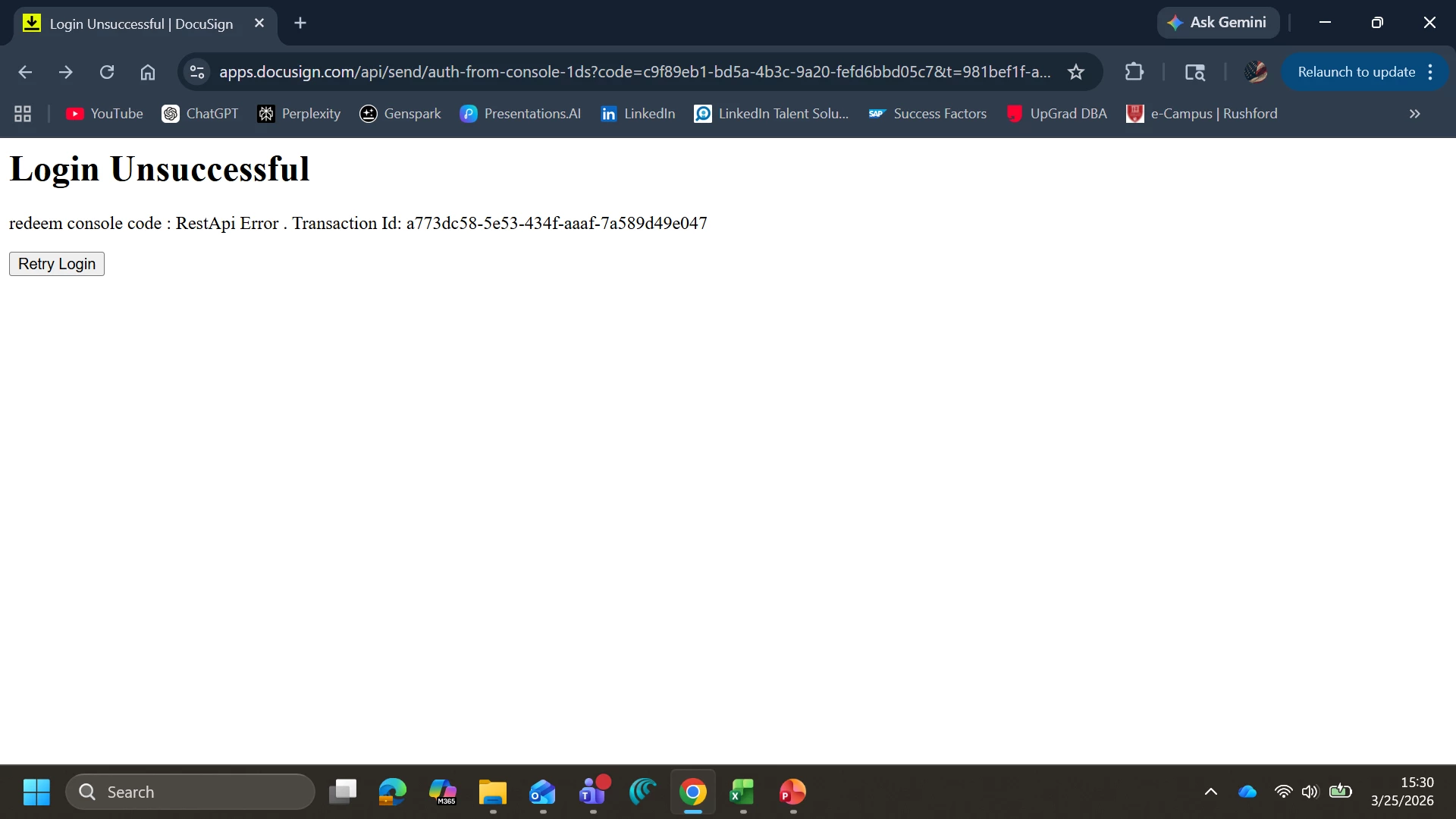
We are experiencing an intermittent connectivity issue with the SAP SuccessFactors (SF) – DocuSign integration. Occasionally, when recruiters send offer letters from SuccessFactors to candidates through DocuSign, the system displays a connection/disconnection error.

Observed Behavior:

  • The issue is not occurring consistently and is difficult to reproduce.
  • When the affected user refreshes the URL/page, the process resumes and works normally.
  • No permanent failure is observed after the refresh.
  • The issue has been occurring intermittently since October 2025.

Request for Guidance:
We would like to understand:

  1. What could cause these intermittent connection failures between SuccessFactors and DocuSign?
  2. Are there any known issues related to session timeouts, API connectivity, authentication tokens, or integration endpoints that could result in this behavior?
  3. What logs (Connect logs, API logs, envelope logs, or integration logs) should we review to identify the root cause?
  4. Has anyone in the community experienced a similar issue and identified a resolution?

Any recommendations on troubleshooting steps or log analysis would be greatly appreciated.


1 reply

Leandro.Reis
Docusign Employee
Forum|alt.badge.img+5
  • Docusign Employee
  • June 9, 2026

Hi ​@Dillip Kumar,

From the screenshot, the error is coming from the Docusign web app:

Login Unsuccessful
redeem console code : RestApi Error . Transaction Id: <GUID>

This message appears when Docusign tries to redeem a short-lived, one-time “console code”/token used to open the embedded sending/offer-letter experience and that redemption fails.

Based on similar incidents we’ve investigated, the most common causes are:

  • One-time code being reused or redeemed twice
    Browser or integration behavior (multiple tabs, back/forward navigation, cached redirects, or JS retries) can trigger duplicate calls to the Docusign “auth-from-console” endpoint. The first call succeeds and consumes the token; the second sees a token not found / invalid_request and surfaces as “Login Unsuccessful – redeem console code : RestApi Error”.

  • Code or session expiring before it’s used
    If there’s a long delay between SuccessFactors generating the link and the recruiter actually opening it, or if the user’s browser/session changes in between (logout, SSO change, network switch), the console code can expire, leading to the same error. Our internal RCA for this error noted that it often happened “when clicking on ‘Prepare and Send’ / tagger,” and was tied to token redemption timing.

  • Browser caching / Chrome-specific behavior
    We’ve seen cases where Chrome browser caching caused multiple POST token calls, one of which gets cancelled and another fails, resulting in intermittent “Login Unsuccessful” even though the user is doing the same steps. Clearing cache or disabling cache reduced frequency in those cases, and a code fix was implemented on our side in the Salesforce integration stack to avoid duplicate calls.

  • Network or proxy in front of the browser
    Proxies or security gateways that replay or de-duplicate requests can also accidentally cause the same single-use URL to be invoked twice.

The fact that refreshing the page then allows the process to continue is consistent with: “first code fails (duplicate/expired), refresh triggers SuccessFactors to obtain a new console code and call Docusign again,” which then works.

Give the above a try, and if you’re still having issues, I recommend opening a support case so we can investigate this further.

Kind regards,

Leandro Reis
Associate Developer Support


