Question

Inconsistency in API and Email Subject Formula

  • May 14, 2026
  • 1 reply
  • 25 views

Forum|alt.badge.img+1

Web Form 

In our travel form we use a formula to pull information from the form to act as the email subject.  
I find the inconsistent use of underscores.
The information being pulled from the form is from the Web Form Field API reference name and that information does not allow spaces:
Travel Start Date
API reference Travel_Start_Date
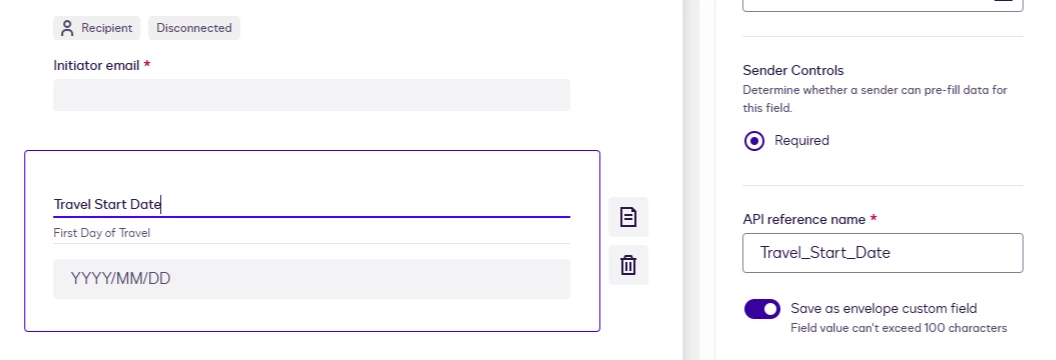
there are underscores in place of the spaces for the API reference

When you use the information in the formula, the underscores need to be removed:
[[ECF:Travel Start Date]]

When the email comes from Docusign there are underscores where the spaces used to be. 
Email subject 2026/05/14_Initiator_Firstname_Lastname_Travel_Destination_Name

I’m not sure where this development evolved but the inconsistencies of underscore for spaces versus spaces and no underscores for the formula to work in my mind is counter intuitive.  Underscores should be used in all cases and consistent across the platform.

Thank you for reading my venting on this issue. I’ve had to reformulate so many times and this inconsistency has caused me many hours of lost work.  

1 reply

Forum|alt.badge.img+3

Hi NBKPR

Thanks for your post.

I’m sorry for the time you’ve lost reworking your formulas – that’s understandably frustrating.

What you’re running into comes from how Web Forms currently handles field names in different places. Each field has:

  • a human‑readable label (for example “Travel Start Date”), which is what the formula engine expects in expressions like [[ECF:Travel Start Date]], and

  • an internal/API reference name (for example “Travel_Start_Date”), which cannot contain spaces and therefore uses underscores.

Some parts of the product (like reporting and certain subject line constructions) use the internal reference name, which is why you’re seeing underscores show up in the email subject, even though the formula itself only works when you use the label with spaces.

In terms of a workaround, the best practices should be:

  • When editing formulas, always insert fields via the field picker so that the label with spaces is used, which avoids formula breakage.

  • Where possible, use “clean” display labels (with spaces) for fields that will appear in subjects, and keep underscores only in the API reference names, so the rendered subject is more readable.

Thanks for sharing the details on this. Feel free to share any idea that you find that can be enhanced by our Product team in the Ideas Portal below, so they can consider it in future improvements:
https://community.docusign.com/ideas

Best Regards,
Thiago | Dev Support Team


