I have created an envelope, as I usually do, and added recipients to sign a document. One recipient receives the email with the link to DocuSign to sign the document, but when he opens it, he is redirected to a login page instead of the document itself. This happens only to this specific recipient. Other recipients do not have this problem.
Does anyone know what might be causing this behavior and how to fix it?
Thank you for connecting with the Docusign Community. We are pleased to welcome you.
I understand that the recipient was redirected to a login page after clicking the review document button. We apologize for the inconvenience this may have caused, and I’m here to help.
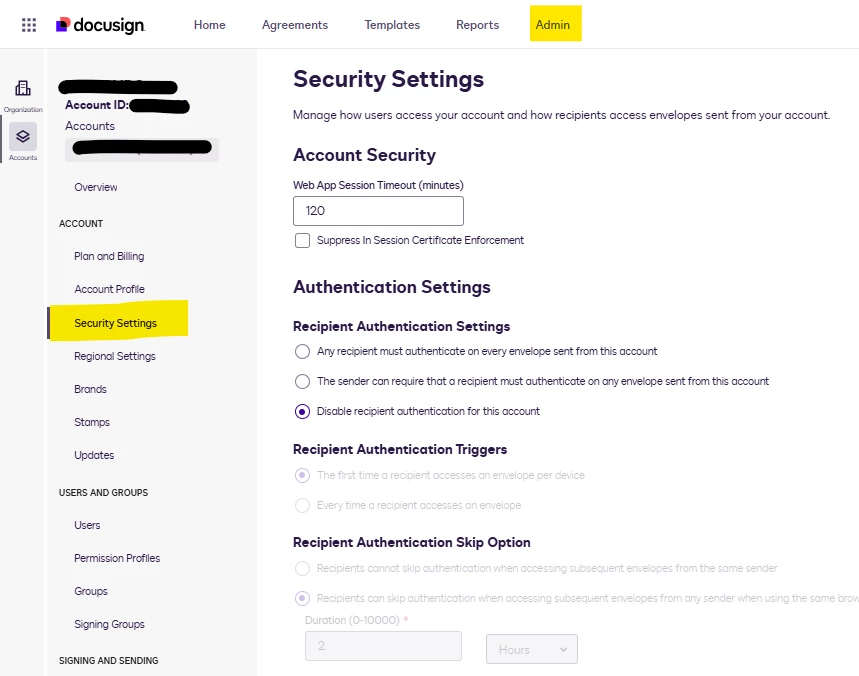
This usually happens when the sender’s account settings require recipients to log in to their Docusign account as part of the authentication process before they can access the document. An admin can review these settings by going to the Admin > Security Settings, where the login requirements for recipients are configured. You may also find it helpful to check the available options outlined in the "Authentication Settings" article. Also, take a look at the image below for reference.
Any updates to these settings will only apply to future envelopes sent.
If the issue persists, feel free to share the Envelope ID where it's occurring, and I’ll be glad to take a closer look.
Looking forward to hearing back from you!
Best regards,
Noralynn | Docusign Community Moderator
If this helps, feel free to Like👍and click "Best Answer."
Thank you for connecting with the Docusign Community. We are pleased to welcome you.
I understand that the recipient was redirected to a login page after clicking the review document button. We apologize for the inconvenience this may have caused, and I’m here to help.
This usually happens when the sender’s account settings require recipients to log in to their Docusign account as part of the authentication process before they can access the document. An admin can review these settings by going to the Admin > Security Settings, where the login requirements for recipients are configured. You may also find it helpful to check the available options outlined in the "Authentication Settings" article. Also, take a look at the image below for reference.
Any updates to these settings will only apply to future envelopes sent.
If the issue persists, feel free to share the Envelope ID where it's occurring, and I’ll be glad to take a closer look.
Looking forward to hearing back from you!
Best regards,
Noralynn | Docusign Community Moderator
If this helps, feel free to Like👍and click "Best Answer."
You can login or register as either a Docusign customer or developer. If you don’t already have a Docusign customer or developer account, you can create one for free when registering.
You can login or register as either a Docusign customer or developer. If you don’t already have a Docusign customer or developer account, you can create one for free when registering.
 Back to Docusign.com