Newcomer
November 4, 2025
Solved

User account status is pending in Salesforce

  • November 4, 2025
  • 4 replies
  • 218 views

Hello DocuSign community,

We have installed a DocuSign package in our org however we encountered an administrator as status ‘Pending’ the rest of our users are in status ‘Active’, please help me out what actions are needed to change the status of this user. Please see attachment for reference.
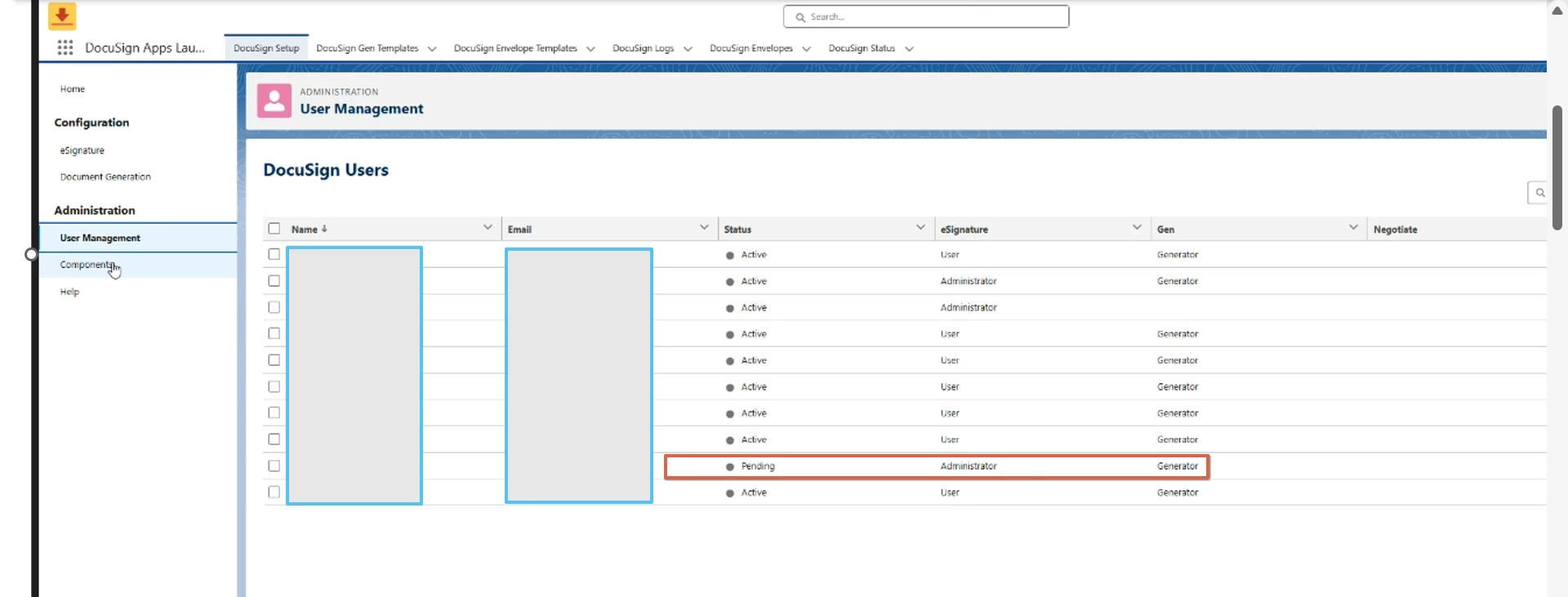
 

Best answer by marco.tanglao

Hello ​@jorgemacedaQ2 

Thank you for reaching out here in Docusign Community.

The user should received an email to activate their account.

You may advise the user to check their spam or junk folder to locate the said email. 

Once they have their account activated, the status should change to active.

If you found the response to be a useful solution to your question, please mark it as the best answer by clicking “Select as Best” to make it easier for other users to find.

Best regards,
Marco | Docusign Community Moderator
"Select as Best" below if you find the answer a valid solution to your issue!

4 replies

Docusign Employee
November 6, 2025

Hello ​@jorgemacedaQ2 

Thank you for reaching out here in Docusign Community.

The user should received an email to activate their account.

You may advise the user to check their spam or junk folder to locate the said email. 

Once they have their account activated, the status should change to active.

If you found the response to be a useful solution to your question, please mark it as the best answer by clicking “Select as Best” to make it easier for other users to find.

Best regards,
Marco | Docusign Community Moderator
"Select as Best" below if you find the answer a valid solution to your issue!

Docusign Employee
November 13, 2025

Hello ​@jorgemacedaQ2 

I hope you are doing well. 

I want to confirm if you were able to solve your issue by utilizing the solution I suggested or if the information I provided was useful.

If so, please mark it as the "Best Answer ✅" by clicking “Select as Best” to make it easier for other users to find.

Otherwise, let me know and I will gladly help you address the situation as soon as possible.

Best regards,
Marco | Docusign Community Moderator

Newcomer
September 16, 2026

sorry not very helpful ! same issue ! missing tons of actual information, anybody can click a link … its what comes next. all substantial information is missing here. what is the EXACT step by step expected user experience ? i see a landing page with that shows my email and activate button, after clicking the button iam directed a login screen? salesforce still shows pending at that step while in DS it shows active now. what it the purpose of the login screen?

Community Moderator
September 17, 2026

Hello ​@lobbies-dearest9m 
Thank you for reaching out, and welcome to the Docusign Community! We appreciate your question and assure you that we are fully committed to providing you with the best service possible. 

Use this procedure to activate your Docusign user:

  1. Open the Account Activation email from Docusign. Check your spam folder if you don't see the message in your inbox.
  2. Select Activate.
  3. Follow the activation prompts on the Docusign Log In page:
    • Existing Docusign users: Enter your Docusign credentials and select Accept Invitation.
    • New Docusign users: Create a Password and Security Question, and select Activate.
  4. Complete your Docusign authentication in Salesforce:

    Important: Your Docusign user is not active until you complete these steps.

    1. Select a Docusign component or custom button on a record and select Authorize.

      The Docusign Log In dialog box opens.

    2. Enter your Docusign credentials or select Company Login to log in with SSO credentials.
    3. Select Log In.
    4. Select Accept.
    5. Select Allow Access.
  5. Enter your Salesforce credentials.

    Note: Salesforce may require you to select Authorize and enter your credentials twice.

You have completed the process. Your Docusign user is active. You can use approved Docusign apps in Salesforce.


Here are related articles you may check.
Activate Your Docusign for Salesforce User
Check the Activation Status of a Docusign for Salesforce User

If you found the response to be a useful solution to your question, please “like” and mark it as the best answer by clicking “Select as Best” to make it easier for other users to find. Thank you!

Sincerely,

Ma. Cassandra | Docusign Community Moderator
If this helped, feel free to Like👍and click "Best Answer"

