Hi, when using the text box field i am trying to change the number of characters allowed in the text. i try to change it but it automatically goes back to 4000. why is this and how can i fix it?
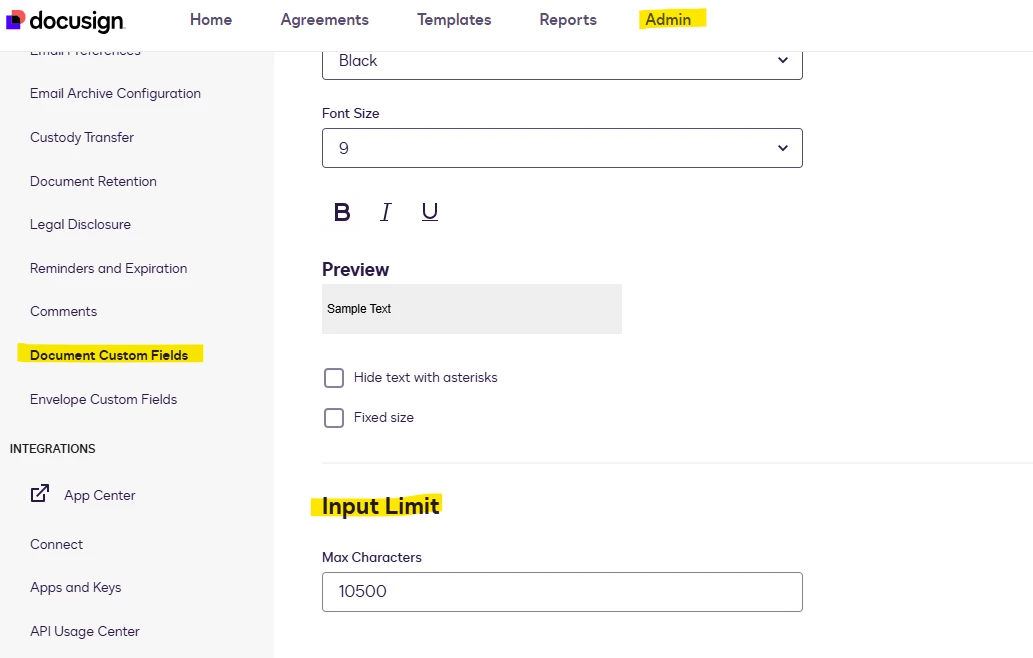
For the standard text fields, the character limit defaults to 4000 and cannot be increased directly. If you need to exceed 4000 characters, you can create a “document customs fields” and increase the input limit.
To do this, go to Admin > Document Custom Fields > Add Document Custom Field. Under the input limit section, specify the maximum characters for the text field, then Save.
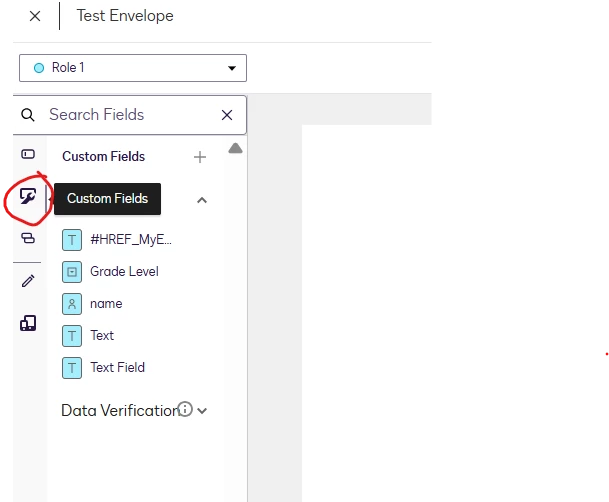
You now have a reusable custom text field available every time you create an envelope. Find your created custom fields in the Custom Fields palette when preparing an envelope or template.
I hope you find this helpful. If you believe this response effectively addresses your question, please mark it as Best Answer ✅to help other users with similar questions and locate it more easily.
If you require any further assistance, please don't hesitate to reach out. Thank you!
Best Regards,
Jenny | Docusign Community Moderator
If this helped,like 👍and mark it as “Best Answer” so others can find it, too!
Thanks for reaching out to the Docusign Community!
I appreciate you sharing your experience. I tested on my end and did not experience the same behavior, the character limit stayed consistent regardless of moving or copying the text box.
Could you please try to create a new envelope and add a new text box field? It would also be helpful if you can try using a different browser or device to see if the behavior persists.
I used a different browser and different envelope and i was able to change the characters to a lower number, but i still can’t increase the number above 4000.
For the standard text fields, the character limit defaults to 4000 and cannot be increased directly. If you need to exceed 4000 characters, you can create a “document customs fields” and increase the input limit.
To do this, go to Admin > Document Custom Fields > Add Document Custom Field. Under the input limit section, specify the maximum characters for the text field, then Save.
You now have a reusable custom text field available every time you create an envelope. Find your created custom fields in the Custom Fields palette when preparing an envelope or template.
I hope you find this helpful. If you believe this response effectively addresses your question, please mark it as Best Answer ✅to help other users with similar questions and locate it more easily.
If you require any further assistance, please don't hesitate to reach out. Thank you!
Best Regards,
Jenny | Docusign Community Moderator
If this helped,like 👍and mark it as “Best Answer” so others can find it, too!
I hope you're doing well. I'm following up on the solution provided above. Could you please confirm whether it addresses your question? If it did, can you please mark it as Best Answer ✅" to assist other users with similar inquiries and improve its visibility. Please let us know if we can assist you with anything else. Wishing you a smooth rest of your day.
You can login or register as either a Docusign customer or developer. If you don’t already have a Docusign customer or developer account, you can create one for free when registering.
You can login or register as either a Docusign customer or developer. If you don’t already have a Docusign customer or developer account, you can create one for free when registering.
 Back to Docusign.com