Question

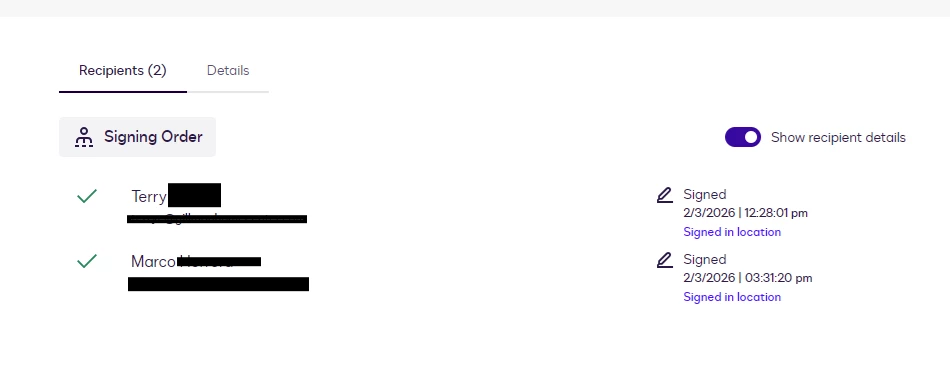
Signing history shows both parties have signed but downloaded document only shows second signers signature.

  • February 13, 2026
  • 4 replies
  • 45 views

Forum|alt.badge.img+1

This has happened to two different people now where they send out a document to be signed and when the first person in the signing order signs they get the email stating that it is their turn and they sign. But when we go to download the signed documents from Docusign, only the second signers signature is there. I have attached a screenshot showing both parties signed. What has happened here? 
 

4 replies

Forum|alt.badge.img+14
  • Community Moderator
  • February 16, 2026

Hello ​@Cringle,

Welcome to the Docusign Community!

Thanks for the details you’ve shared so far. To look into this issue more thoroughly, could you please send a private message and provide the Envelope ID for the affected envelope? 

👉 Locate a Docusign envelope ID


Regards,

Jenny | Docusign Community Moderator


Forum|alt.badge.img+1
  • Author
  • Newcomer
  • February 17, 2026

Hello ​@Cringle,

Welcome to the Docusign Community!

Thanks for the details you’ve shared so far. To look into this issue more thoroughly, could you please send a private message and provide the Envelope ID for the affected envelope? 

👉 Locate a Docusign envelope ID


Regards,

Jenny | Docusign Community Moderator


Thank you! I just sent you a message!


Forum|alt.badge.img+14
  • Community Moderator
  • February 17, 2026

Hello ​@Cringle 

Thank you for providing the Envelope ID. I reviewed both envelopes you shared, and I was able to confirm what happened.

In both envelopes, the first recipient did not have any signature fields assigned to them. As long as they complete the other fields assigned to them, the system will still mark their step as Signed/Completed, even though no signature field existed for them to fill.

This is why, when you download the completed documents, only the second signer’s signature is visible. The second recipient is the only one who had signature tabs assigned in the envelope setup.

If you’re using a template, kindly double‑check that all fields are correctly added and assigned to the appropriate recipients before sending the envelope.

I hope this is helps. Let us know if you have any further questions


Best Regards,

Jenny | Docusign Community Moderator

If this helped, like 👍and mark it as “Best Answer”


Forum|alt.badge.img+14
  • Community Moderator
  • February 27, 2026

Hello ​@Cringle,

I hope you're doing well. I'm following up on the above solution provided. Could you please confirm whether it addressed your question? If it did, can you please mark it as Best Answer ✅" to assist other users with similar inquiries and improve its visibility. Let us know if we can help with anything else. Wishing you a smooth rest of your day! 


Regards,

Jenny | Docusign Community Moderator

