By using Web Form, I have set up a process where an employee needs to find an envelope using information from a specific field in the webform (an adress field). I’ve tried to use the the advanced search option to include a search for custom fields, but this does ot seem to work.
Envelope custom fields show up in the envelope when you’re preparing to send one. They can be optional or required.
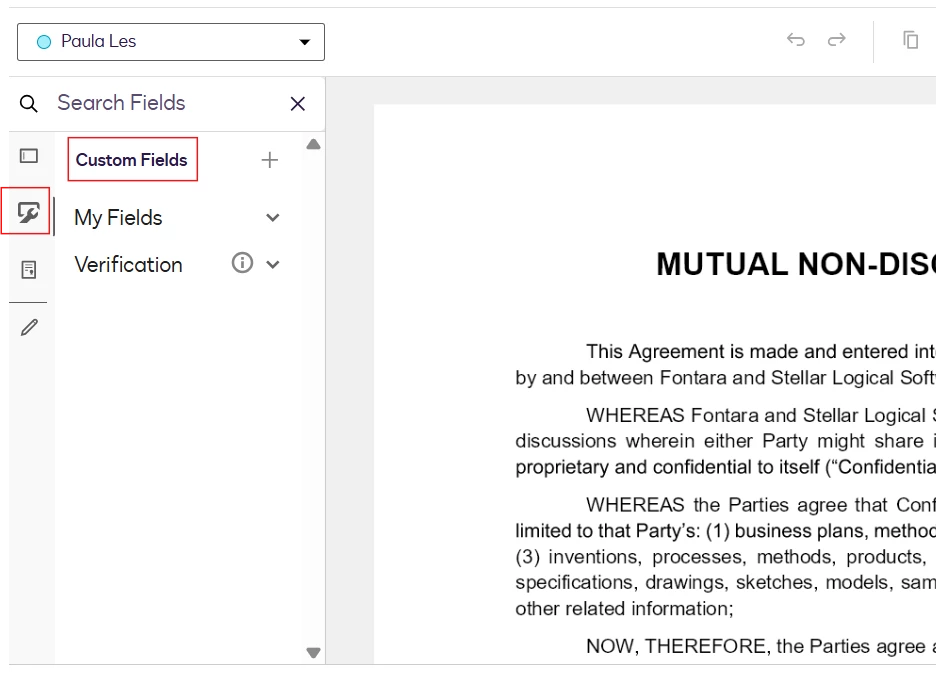
Document custom fields show up in the table of fields when you’re placing fields in a document. See the figure.
The figure that you sent is from a web form.
Try to use the Reports option. There select on the left Document Data, then Web forms, on the right select a web form. Use the Edit Filters option then select Add Condition, select the fields that you would like to use for search. (filter).
I hope that helps, if so, I’d appreciate your like here.
Best,
Alexandre
Your feedback is very appreciated! You can give a Like and mark this answer as the "Best Answer" for your issue. DocuSign University http://dsucustomers.docusign.com
I hope you’re doing well. I'm following up on the above solution provided. Could you please confirm whether it addressed your question? If it did, can you please mark it as Best Answer ✅" to assist other users with similar inquiries and improve its visibility. Let us know if we can help with anything else. Wishing you a smooth rest of your day!
You can login or register as either a Docusign customer or developer. If you don’t already have a Docusign customer or developer account, you can create one for free when registering.
You can login or register as either a Docusign customer or developer. If you don’t already have a Docusign customer or developer account, you can create one for free when registering.
 Back to Docusign.com