New Voice
August 8, 2024
Solved

Resizing Fields - Large fields obscure adjacent information

  • August 8, 2024
  • 13 replies
  • 598 views

I send lots of applications with very dense forms, search google for ACORD 125 for an example. I know how to resize text boxes, but there seems to be a minimum size. Those fields then overlap each other and hide adjacent text. 

Is there a way to either reduce the minimum size or add transparency to text boxes and other fields?
Best answer by Christopher.Alpizar

Hello @SuttonBBINS,

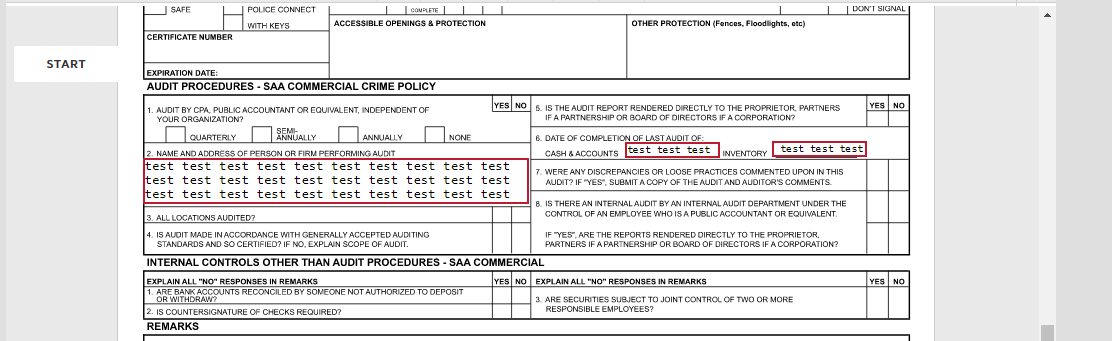
This is my test:
 

Is this what you are looking for?

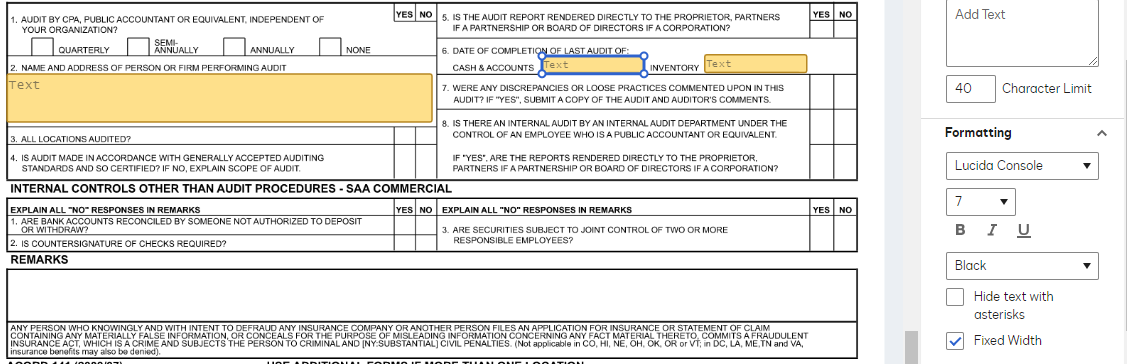
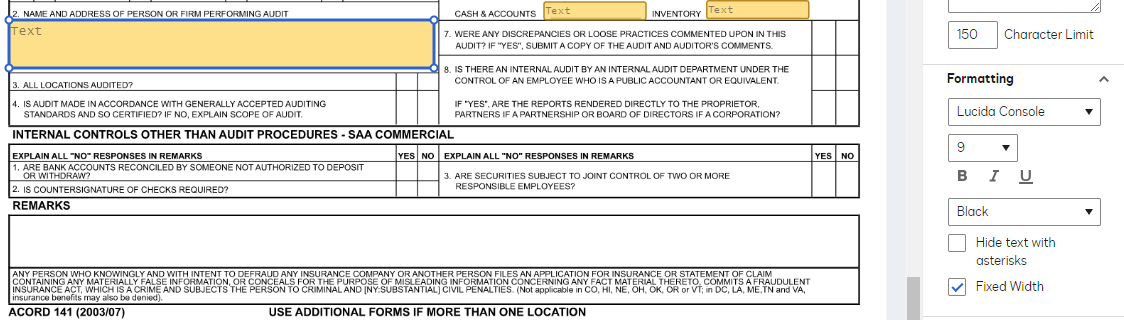
This is the text configuration for the Q.2:
 

And this for Q.6:
 

In both instances you will need to manually set the size of the text field, when you set the Fixed Width and change the font size along with the Character limit you will outline the parameters of the character input and how it is shown in the system.

Let us know if you need further assistance.


Best regards,

Christopher | Docusign Community Moderator

"Select as Best" below if you find the answer a valid solution to your issue.

13 replies

Docusign Employee
October 4, 2024

Hello @SuttonBBINS,

This is my test:
 

Is this what you are looking for?

This is the text configuration for the Q.2:
 

And this for Q.6:
 

In both instances you will need to manually set the size of the text field, when you set the Fixed Width and change the font size along with the Character limit you will outline the parameters of the character input and how it is shown in the system.

Let us know if you need further assistance.


Best regards,

Christopher | Docusign Community Moderator

"Select as Best" below if you find the answer a valid solution to your issue.

New Voice
October 9, 2024

Is there a way to change the default formatting for text boxes? It seems the current default is 4000 characters, variable width.

Docusign Employee
October 10, 2024

Hello @SuttonBBINS,

As an administrator, you can enable optional fields and their properties for the sending settings of an account. This includes defining the default font for fields, enabling formula fields for dynamic calculations, enabling conditional fields for conditional logic, enabling conditional routing for envelope routing based on data, allowing admins to share custom fields with other users, and writing the initial value of fields for all recipients when an envelope is sent. Fields and Properties

Let us know if you need further assistance.


Best regards,

Christopher | Docusign Community Moderator

"Select as Best" below if you find the answer a valid solution to your issue.