Thank you for engaging with the Docusign Community. We are pleased to have you here.
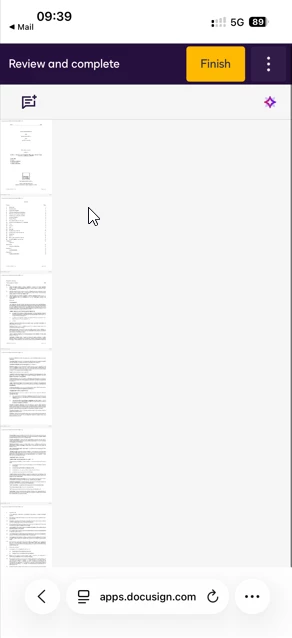
I’m sorry to hear you’re having trouble with the documents sent for signature. I understand that the recipient cannot properly view them, as they appear too small when viewed in a mobile browser. I’ll be glad to help.
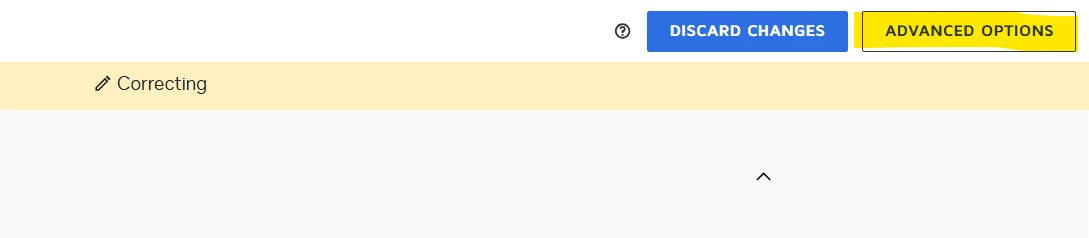
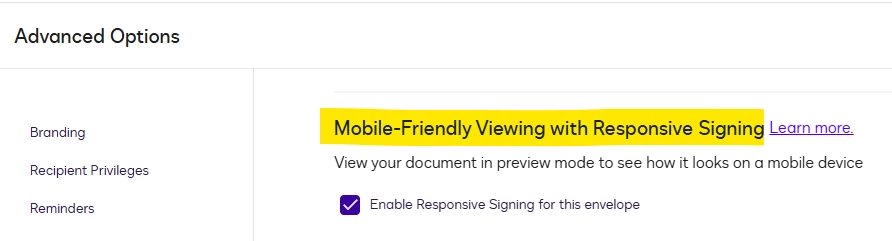
Based on the screenshot provided, it appears the envelope was not set to the mobile-friendly view. To check, please navigate to Agreements > locate the envelope, select Correct, then click Advanced Options. Mobile-Friendly should be checked. Please take a look at the image below for reference.
Additionally, an administrator can enable the Responsive Signing in the admin settings. This can improve how documents are displayed based on the signer’s device type. This article may be helpful for more information: Responsive Signing.
Once done, please resend the envelope and check if it worked! If the issue persists, kindly provide the envelope ID via private message so I can check and review.
If my response helped solve your concern, could you click the “Best Answer ✅” button below the post? That helps others in the Community find trusted answers faster.
Sincerely,
Noralynn | Docusign Community Moderator
If this helped, feel free to Like👍and click "Best Answer."
Thank you for engaging with the Docusign Community. We are pleased to have you here.
I’m sorry to hear you’re having trouble with the documents sent for signature. I understand that the recipient cannot properly view them, as they appear too small when viewed in a mobile browser. I’ll be glad to help.
Based on the screenshot provided, it appears the envelope was not set to the mobile-friendly view. To check, please navigate to Agreements > locate the envelope, select Correct, then click Advanced Options. Mobile-Friendly should be checked. Please take a look at the image below for reference.
Additionally, an administrator can enable the Responsive Signing in the admin settings. This can improve how documents are displayed based on the signer’s device type. This article may be helpful for more information: Responsive Signing.
Once done, please resend the envelope and check if it worked! If the issue persists, kindly provide the envelope ID via private message so I can check and review.
If my response helped solve your concern, could you click the “Best Answer ✅” button below the post? That helps others in the Community find trusted answers faster.
Sincerely,
Noralynn | Docusign Community Moderator
If this helped, feel free to Like👍and click "Best Answer."
You can login or register as either a Docusign customer or developer. If you don’t already have a Docusign customer or developer account, you can create one for free when registering.
You can login or register as either a Docusign customer or developer. If you don’t already have a Docusign customer or developer account, you can create one for free when registering.
 Back to Docusign.com