Recently our In Progress envelope view changed. I don’t find it as user friendly as the old view and it is more time consuming to find the information/task I want. Is there a way to switch back to the old version?
Welcome to the Docusign Community—great to have you here, and we're happy to share our knowledge with you!
I completely understand how frustrating it can feel when a familiar interface suddenly changes. When you're used to a layout that helps you work quickly, having to adjust to a new view can really slow down your workflow.
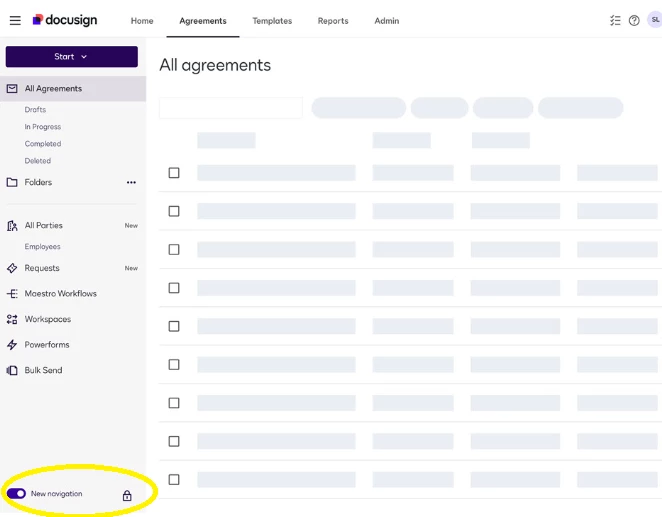
The good news is you can revert back to the old layout. Just go to the Agreements/Templates side panel and click the lock icon next to the New Navigation toggle.
Just a suggestion as well—you might also find the Docusign Unified task management feature helpful. It gives you one central place to manage tasks across your DocuSign applications, making it easier to stay organized, prioritize your work, and keep agreements moving efficiently 👉 Docusign Unified Task Management.
I hope you find this helpful. If yes, we would greatly appreciate it if you could give it a like👍and mark it as "Best Answer" ✅, to help other community members find trusted answers .😊
Let us know if you have questions— we're here for you!
Regards,
Melanie | Docusign Community Moderator If this helped clarify things, feel free to Like👍and click "Best Answer"
Welcome to the Docusign Community—great to have you here, and we're happy to share our knowledge with you!
I completely understand how frustrating it can feel when a familiar interface suddenly changes. When you're used to a layout that helps you work quickly, having to adjust to a new view can really slow down your workflow.
The good news is you can revert back to the old layout. Just go to the Agreements/Templates side panel and click the lock icon next to the New Navigation toggle.
Just a suggestion as well—you might also find the Docusign Unified task management feature helpful. It gives you one central place to manage tasks across your DocuSign applications, making it easier to stay organized, prioritize your work, and keep agreements moving efficiently 👉 Docusign Unified Task Management.
I hope you find this helpful. If yes, we would greatly appreciate it if you could give it a like👍and mark it as "Best Answer" ✅, to help other community members find trusted answers .😊
Let us know if you have questions— we're here for you!
Regards,
Melanie | Docusign Community Moderator If this helped clarify things, feel free to Like👍and click "Best Answer"
How are you? We'd like to know if my previous response addressed your questions. If so, we hope you could consider selecting it as Best Answer ✅," so others can find it too.
Otherwise, if you still require further assistance, please don't hesitate to let us know. We are always happy to help!
The toggle works only for that open session. When you close and reopen site it reverts back to New Navigation and you have to continually turn it off each time logging in.
Hello @DJohnson Thank you for providing those details. Could you please try disabling the New Sending Experience from your account settings and check if the behavior persists?
If you have Admin access, please go to: Admin > Sending Settings > Disable New Sending Experience
Make sure to save the changes, then log out of your Docusign account and log back in to see if the setting is retained. Please let us know if you continue to experience the same behavior after trying this.
Sincerely,
Ma. Cassandra | Docusign Community Moderator If this helped, feel free to Like👍and click "Best Answer"
You can login or register as either a Docusign customer or developer. If you don’t already have a Docusign customer or developer account, you can create one for free when registering.
You can login or register as either a Docusign customer or developer. If you don’t already have a Docusign customer or developer account, you can create one for free when registering.
 Back to Docusign.com