Question

Need Sender to fill out required fields and signer to fill out fields based on senders required fields.

  • April 15, 2026
  • 2 replies
  • 45 views

Forum|alt.badge.img

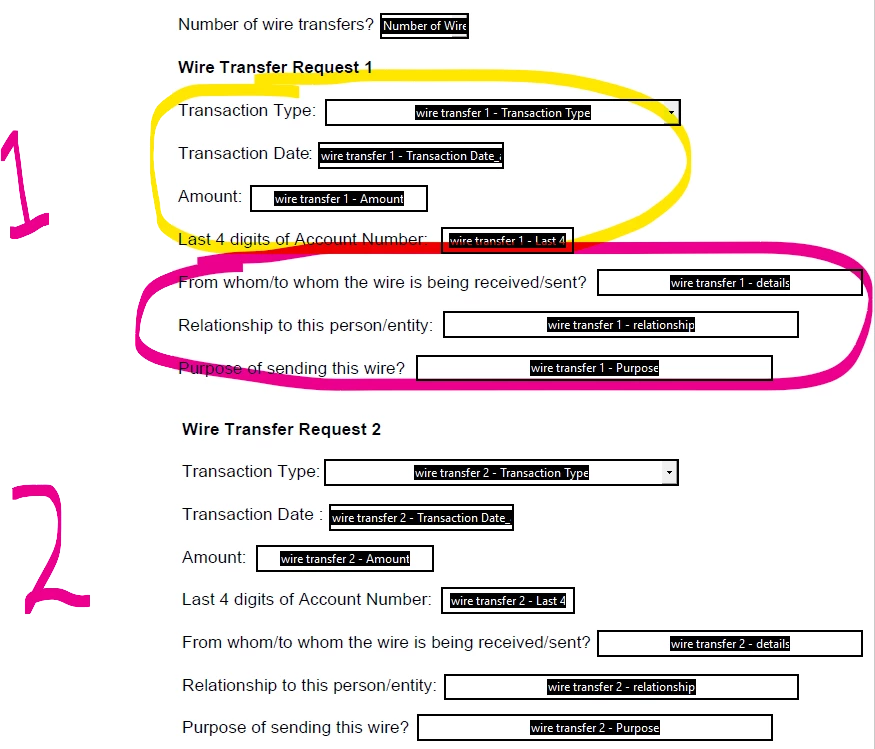
For example, if there is a form that has 10 hard coded sections for wire transfers.


1. The sender would be required to fill out first 4 fields for as many wire transfer sections they will need from the recipient with a minimum of being at least first section up to 10.

2.  The recipient would be required to fill out the last 3 fields in the sections that have data that was filled out by sender

3.   If a section has no content from the sender, then the recipient does not have to fill out the last 3 fields in that section.


Is there a way to ensure client fills out last 3 fields for each section the sender has data in the first 4 fields?


2 replies

Forum|alt.badge.img+14
  • Community Moderator
  • April 17, 2026

Hello ​@mlampo 

Thank you for reaching out, and welcome to the Docusign Community! We appreciate your question and assure you that we are fully committed to providing you with the best service possible.
It's not possible exactly as described, but you can achieve the behavior using conditional fields + required fields, with a trigger (like a checkbox) per section. Currently, Docusign does not support automatically making recipient fields required based purely on whether a sender filled out other fields (e.g., “if sender enters any value, then require signer fields”).
You can achieve a similar result using conditional fields. Docusign allows fields to appear or be hidden based on another field’s value. When a field is visible, you can mark it as Required. When it’s hidden, it is not required

How to apply this to your scenario:
For each wire section:
Add a trigger field (e.g., checkbox or dropdown like “Include this section?”)
Configure the signer’s last 3 fields as conditional fields:

  • They only appear when the trigger field = “Yes”
  • Set them as Required

For more details, you may check this article:
Define a Conditional Field


If you found the response to be a useful solution to your question, please “like” and mark it as the best answer by clicking “Select as Best” to make it easier for other users to find. Thank you!

Sincerely,

Ma. Cassandra | Docusign Community Moderator
If this helped, feel free to Like👍and click "Best Answer"


Forum|alt.badge.img+14
  • Community Moderator
  • April 27, 2026

Hello ​@mlampo 

I trust all is well. We’d like to know if the suggested solution was helpful. If yes, we would greatly appreciate it if you could mark it as "Best Answer" ✅, to help other community members find trusted answers.😊
 

Let us know if you need further assistance—we're here for you!

Sincerely,

Ma. Cassandra| Docusign Community Moderator

