Question

Is it possible to remove the option for Access Codes & SMS Authentication on Envelopes

  • December 2, 2025
  • 3 replies
  • 22 views

Forum|alt.badge.img

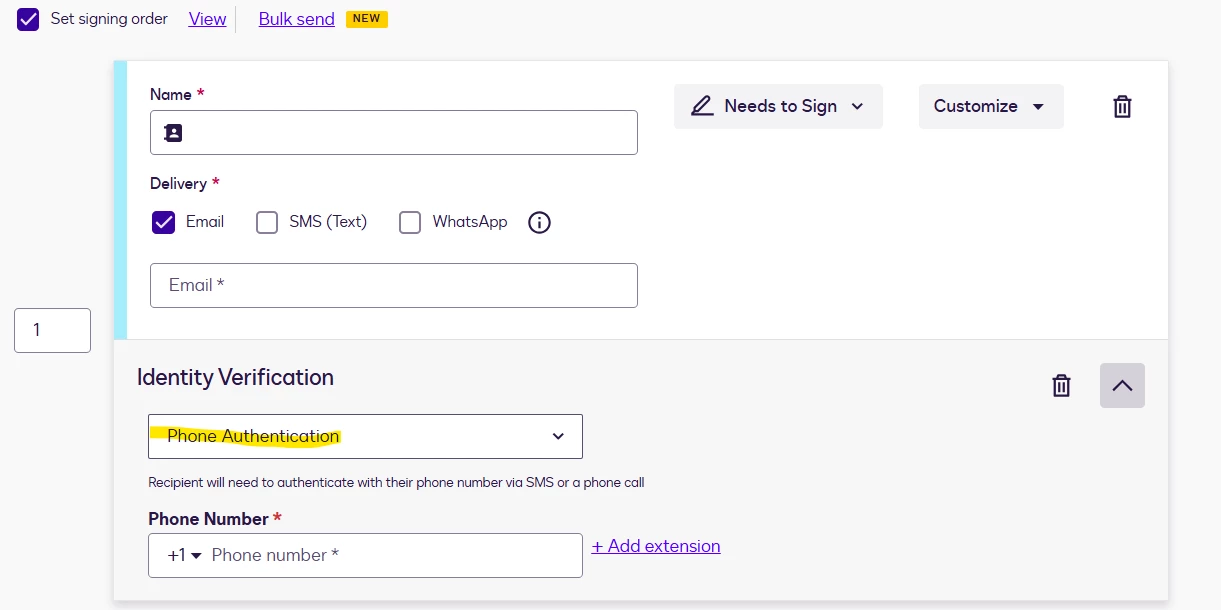
Is it possible to remove the options below from an envelope on creation?  We don’t want our users to use this (force them to use AES/QES) and removing the option is the more effective method to achieve this.



3 replies

Forum|alt.badge.img+13
  • Community Moderator
  • December 3, 2025

Hello ​@KieraMears 

Thank you for reaching out, and welcome to the Docusign Community! We appreciate your question and assure you that we are fully committed to providing you with the best service possible. 
To disable phone authentication, your account admin should turn it off under the Admin tab > Identity verification. For the access code, since it looks like it won’t be disabled even if you try to turn it off under Admin > Security Settings > Disable recipient authentication for this account
We suggest that you choose from the options below instead. 

Recipient Authentication Triggers : This section controls how often recipient authentication is required for recipients. This setting applies to Phone Authentication, SMS Authentication, Knowledge-Based ID, and Access Code checks. The available settings are as follows: 

  • The first time a recipient accesses an envelope per device The recipient must pass the authentication check the first time that they access an envelope on a given device.

    With this setting, recipients are not asked to authenticate again when they access the envelope from the same browser, on the same device. If the recipient attempts to access the envelope from a different browser or a different device, the recipient must pass authentication again. Once authenticated, that recipient is not challenged again on the new device or browser.

    When using Access Codes with this setting, the recipient is not prompted to authenticate again after the first time, even if using a different device.

    • Completed envelopes are accessible without additional authentication This setting offers the option to reduce the authentication burden for completed envelopes. When selected, it allows authentication from signing to persist. The recipient does not need to re-authenticate when accessing a completed envelope, regardless of the device or browser they use.
  • Every time a recipient accesses an envelope The recipient must pass the authentication check each time that they try to access the envelope. However, this option can be modified by setting a time for the Recipient Authentication Skip Option.

For more details, you may check this article: 
Authentication Settings

If you found the response to be a useful solution to your question, please “like” and mark it as the best answer by clicking “Select as Best” to make it easier for other users to find. Thank you!

Sincerely,

Ma. Cassandra | Docusign Community Moderator
If this helped, feel free to Like👍and click "Best Answer."


Forum|alt.badge.img
  • Author
  • New Voice
  • December 4, 2025

Unfortunately that doesn’t help in my case.  Under Admin > Identity Verification there isn’t an option listed for phone authentication, which is why I don’t know how to remove it from the envelopes.  Are you able to suggest anything else?


And noted on the second point - Ultimately there isn’t a way to remove access codes.


Forum|alt.badge.img+13
  • Community Moderator
  • December 4, 2025

Hello ​@KieraMears 
I’m sorry that the issue is still unresolved. Due to the limitations we have here in the Community, we recommend that you create a support case so that an expert can investigate this matter further.

Relevant articles;
Deactivate Identity Verification Configurations
Authentication Settings

If you found the response to be a useful solution to your question, please “like” and mark it as the best answer by clicking “Select as Best” to make it easier for other users to find. Thank you!

Sincerely,

Ma. Cassandra | Docusign Community Moderator
If this helped, feel free to Like👍and click "Best Answer."


