Solved

I created multiple signatures for different occasions, but there is no way for me to choose which one I'm gonna use

  • February 8, 2025
  • 4 replies
  • 83 views

Forum|alt.badge.img

I created multiple signatures (in different languages, actually) for different occasions, but there is no way for me to choose which one I'm gonna use. In all the documents that I was signing, my first signature was always being chosen automatically. I neither find any place I can choose which signature to use, nor find any settings about default signature to be used. Please help me.

Best answer by Vinicius.Rodrigues

Hi ​@shaolinzheng !

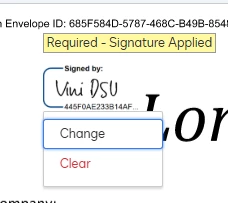
Try to click on your signature and check if a dropdown will appear, like this image below:


4 replies

Vinicius.Rodrigues
Docusign Employee
Forum|alt.badge.img+19

Hi ​@shaolinzheng !

Try to click on your signature and check if a dropdown will appear, like this image below:


Forum|alt.badge.img+17
  • Docusign Employee
  • February 25, 2025

Hello ​@shaolinzheng ,

If you found the provided response to be a useful solution to your question, please mark it as the best answer by clicking “Select as Best” to make it easier for other users to find.


Best regards,

Nathaly | Docusign Community Moderator
"Select as Best" below if you find the answer a valid solution to your issue!


Forum|alt.badge.img
  • Newcomer
  • April 2, 2026

I have the same problem: multiple signatures are in my account. However, my challenge is that sometimes I can right click and change and sometimes not. I have not been able to find out why and this is really big practical issue.


Forum|alt.badge.img+15
  • Community Moderator
  • April 7, 2026

Hello ​@Pepman72,

Thanks for reaching out to the Docusign Community!

You may check this DocuSign support article for more information on why you cannot change your signature during signing: Why Can't I Change My Signature?

I hope this helps. Let me know if you need further assistance.


Best Regards,

Jenny | Docusign Community Moderator

