Hi I have been trying all sorts but cannot resize a text field in an envelope, I have tried logging into the support portal but its not working neither is the chat box. I’m getting fed up now so not sure what else to try. How do I cancel the subscription?
Thank you for reaching out to the Docusign Community! We understand you are considering cancelling your subscription due to your challenges with text field resizing. We know how frustrating it can be to have a feature you cannot use, especially when trying to complete an important task. Rest assured, I'm here to assist you to the best of my ability.
Let’s tackle a few of the issues you raised:
Issue 1: Cannot log in support portal.
Is the email address you're using here in the Docusign Community also the one associated with your Docusign account? Are you encountering an error message when logging in to the Docusign Support Portal? Can you please try to clear your browser's cache and cookies, use a different browser, or incognito/private browsing mode, and try to Open a case in the Docusign Support Center?
Issue 2: Unable to resize text field
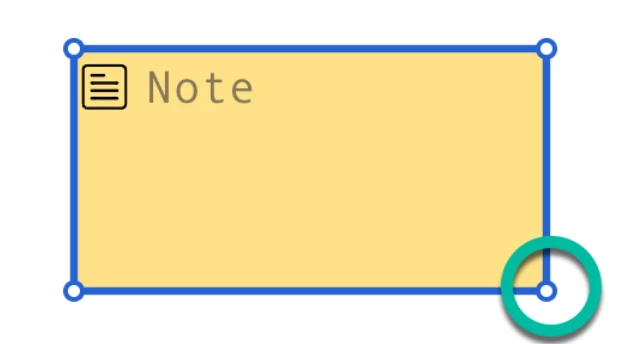
The fields that can be scaled have sizing handles located at each corner. Can you please confirm whether you are unable to drag these corner handles to resize?
Note: Fields which are populated automatically with recipient information cannot be resized. For example, the Name, Email, Company, and Title fields. When the recipient opens the documents to sign, these fields resize automatically to match the recipient information.
Thank you for reaching out to the Docusign Community! We understand you are considering cancelling your subscription due to your challenges with text field resizing. We know how frustrating it can be to have a feature you cannot use, especially when trying to complete an important task. Rest assured, I'm here to assist you to the best of my ability.
Let’s tackle a few of the issues you raised:
Issue 1: Cannot log in support portal.
Is the email address you're using here in the Docusign Community also the one associated with your Docusign account? Are you encountering an error message when logging in to the Docusign Support Portal? Can you please try to clear your browser's cache and cookies, use a different browser, or incognito/private browsing mode, and try to Open a case in the Docusign Support Center?
Issue 2: Unable to resize text field
The fields that can be scaled have sizing handles located at each corner. Can you please confirm whether you are unable to drag these corner handles to resize?
Note: Fields which are populated automatically with recipient information cannot be resized. For example, the Name, Email, Company, and Title fields. When the recipient opens the documents to sign, these fields resize automatically to match the recipient information.
You can login or register as either a Docusign customer or developer. If you don’t already have a Docusign customer or developer account, you can create one for free when registering.
You can login or register as either a Docusign customer or developer. If you don’t already have a Docusign customer or developer account, you can create one for free when registering.
 Back to Docusign.com