New Voice
June 12, 2024
Solved

How to change authorized esignature sender/email for Web Forms?

  • June 12, 2024
  • 2 replies
  • 132 views

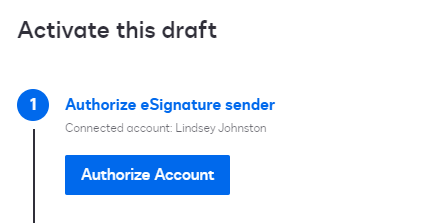
When I click “edit” it only shows “Authorize Account” it doesnt allow me to change the connected account.



Best answer by JohnSantos

@ljohnston 

Open another browser window and Log Out from your current session.  This will trigger the Authorization Account to prompt you to enter a different user.

2 replies

JohnSantos
Guru
Guru
June 12, 2024

@ljohnston 

Open another browser window and Log Out from your current session.  This will trigger the Authorization Account to prompt you to enter a different user.

Welcome to the DocuSign Community! Your feedback is highly valued. If you find my response helpful, please give it a "Like" and consider marking it as the "Best Answer" to assist others with similar issues.
Docusign Employee
June 27, 2024

Hi @ljohnston,


I hope you are doing well.


I would like to confirm if you were able to solve your issue by utilizing the solution that was suggested? 


If so, please mark it as the best answer by clicking “Select as Best” to make it easier for other users to find.


Otherwise, feel free to let me know and I will gladly help you address the situation as soon as possible.


Best regards,   

Alejandro R. | Docusign Community Moderator   

"Select as Best" below if you find the answer a valid solution to your issue!


