Solved

Hiding recipient details

  • November 21, 2025
  • 6 replies
  • 59 views

Forum|alt.badge.img+1

Hello,

I have an envelope template which requires two signers. The first signer are customers that we work with and the second signer is somebody internal whom has to sign off on the document. 

I want to find a way where the second signer can view the details of the first signer, but when the form is complete, the first signer cannot see the details that was input into the form once they receive their completed copy.

Is this possible? How can this be done?

Best answer by JohnSantos

@cat_dad 

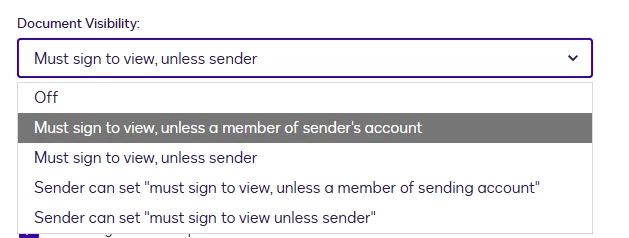
You also have to adjust the Sending Settings and watch out for users on the sending account: 


6 replies

JohnSantos
Guru
Forum|alt.badge.img+21
  • Guru
  • November 21, 2025

@cat_dad 

Yes, you can do it if you use Document Visibility and split the content into two documents so each recipient only sees what they should see. The key is that DocuSign cannot “hide” fields within the same document after signing. If the first signer can see the document during signing, they’ll also see it in their completed copy. 


Forum|alt.badge.img+1
  • Author
  • New Voice
  • November 21, 2025

@JohnSantos thanks for your response. But would this mean that the second signer be able to see all of the details that was filled out from the first signer?


JohnSantos
Guru
Forum|alt.badge.img+21
  • Guru
  • November 21, 2025

@cat_dad 

Yes. If you set it up the right way, the second signer will see every field the first signer completed.

You can find out the details on how to set Document Visibility here: Set Document Visibility


Forum|alt.badge.img+1
  • Author
  • New Voice
  • November 21, 2025

@JohnSantos got it. I did a test in the format you recommended. But the first signer is still able to see the details from the second signer when Docusign sends the completed form. Do you know if we can set the visibility where the first signer does not see the details of the second signer in the completed form? 


JohnSantos
Guru
Forum|alt.badge.img+21
  • Guru
  • Answer
  • November 21, 2025

@cat_dad 

You also have to adjust the Sending Settings and watch out for users on the sending account: 


Forum|alt.badge.img+13
  • Community Moderator
  • December 1, 2025

Hello ​@cat_dad 

How are you? I'm checking in to see if you still need help. If so, please provide more context here or confirm if the issue has been resolved. 

If you have any problems, we're happy to help you with them here. Wishing you a smooth rest of your day!

If you found the response to be a useful solution to your question, please “like” and mark it as the best answer by clicking “Select as Best” to make it easier for other users to find. Thank you!


Sincerely,

Ma. Cassandra | Docusign Community Moderator

If this helped, feel free to like 👍 and click "Best Answer."