How to make fields (checkbox, text, signature) optional, yet still visually prompt the signatory to review them - without blocking completion and without adding required elements (radio button, required text etc.).
Hello @MishaBanking Thank you for reaching out, and welcome to the Docusign Community! We appreciate your question and assure you that we are fully committed to providing you with the best service possible.
In Docusign eSignature, fields can only be set as either required or optional—there isn’t a built-in way to make a field “optional but must be reviewed.” To achieve what you’re looking for:
Set the fields as optional (not required)
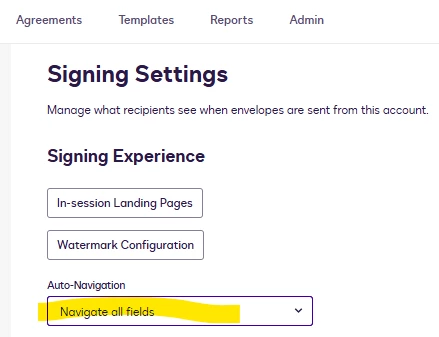
Enable Auto-Navigation for all fields so signers are guided through them during signing.
This will visually prompt the signer to review the fields without blocking completion.
If you found the response to be a useful solution to your question, please “like” and mark it as the best answer by clicking “Select as Best” to make it easier for other users to find. Thank you!
Sincerely,
Ma. Cassandra | Docusign Community Moderator If this helped, feel free to Like👍and click "Best Answer."
Hello @MishaBanking Thank you for reaching out, and welcome to the Docusign Community! We appreciate your question and assure you that we are fully committed to providing you with the best service possible.
In Docusign eSignature, fields can only be set as either required or optional—there isn’t a built-in way to make a field “optional but must be reviewed.” To achieve what you’re looking for:
Set the fields as optional (not required)
Enable Auto-Navigation for all fields so signers are guided through them during signing.
This will visually prompt the signer to review the fields without blocking completion.
If you found the response to be a useful solution to your question, please “like” and mark it as the best answer by clicking “Select as Best” to make it easier for other users to find. Thank you!
Sincerely,
Ma. Cassandra | Docusign Community Moderator If this helped, feel free to Like👍and click "Best Answer."
How are you? I'm just checking in to see if you still need help. If yes, please reply here with more context, or confirm if the issue has been resolved.
If you run into any problems, we're happy to help with those here. Wishing you a smooth rest of your day!
If you found the response to be a valuable solution to your question, please “like” and mark it as the best answer by clicking “Select as Best” to make it easier for other users to find. Thank you!
Sincerely,
Ma. Cassandra | Docusign Community Moderator If this helped. Feel free to Like👍and click "Best Answer."
You can login or register as either a Docusign customer or developer. If you don’t already have a Docusign customer or developer account, you can create one for free when registering.
You can login or register as either a Docusign customer or developer. If you don’t already have a Docusign customer or developer account, you can create one for free when registering.
 Back to Docusign.com