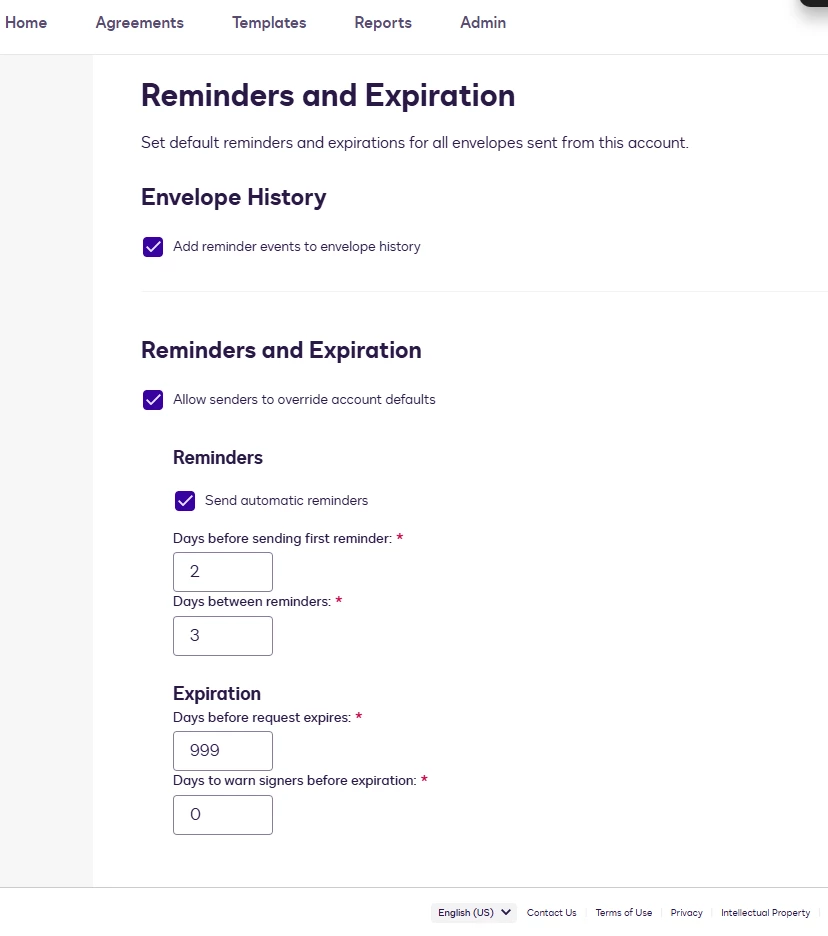
Is there any way we can remove the expiration date set at the account level for docusigns? for the network fee project I’m having to resend all agreements every time they expire, and it’s causing a lot of extra work. I will still be able to choose an expiration date, but it will be further out than 30 days.
Thanks for reaching out, and welcome to the Docusign Community!
We cannot completely remove the expiration for envelopes, but the expiration period can be adjusted, up to 999 days. 👉 Envelope Expiration
Please note:
Changes made at the account level will only apply to envelopes sent after the update.
If you are using templates, be sure to also update the expiration settings within each template so that future envelopes generated from them inherit the longer expiration window. (Select Edit and navigate to Advanced Options)
If you are the account admin, you can adjust the default expiration settings by navigating to Admin > Reminders and Expiration.
I hope this helps clarify things! If you found this response helpful, feel free to give it a like or mark it as the best answer. Let us know if you have any further questions
Thanks for reaching out, and welcome to the Docusign Community!
We cannot completely remove the expiration for envelopes, but the expiration period can be adjusted, up to 999 days. 👉 Envelope Expiration
Please note:
Changes made at the account level will only apply to envelopes sent after the update.
If you are using templates, be sure to also update the expiration settings within each template so that future envelopes generated from them inherit the longer expiration window. (Select Edit and navigate to Advanced Options)
If you are the account admin, you can adjust the default expiration settings by navigating to Admin > Reminders and Expiration.
I hope this helps clarify things! If you found this response helpful, feel free to give it a like or mark it as the best answer. Let us know if you have any further questions
I hope you’re doing well. I’m following up to see if the information shared above was helpful. If it added clarity or answered your question, marking it as Best Answer ✅ will highlight it for others in the community. If you still need more support, we’re here to help.
You can login or register as either a Docusign customer or developer. If you don’t already have a Docusign customer or developer account, you can create one for free when registering.
You can login or register as either a Docusign customer or developer. If you don’t already have a Docusign customer or developer account, you can create one for free when registering.
 Back to Docusign.com