Newcomer
August 14, 2026
Question

Development Environment - Duplicate Checkbox Issue

  • August 14, 2026
  • 2 replies
  • 38 views

In our development Docusign environment, we are seeing duplicate control fills -
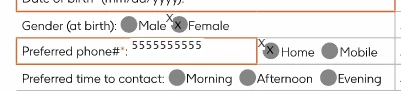
 

Duplicate tab fills in checkboxes

We do not see this in production Docusign and cannot trace this to code related or template related issues.  Is anyone seeing this in their Docusign development environment?  The only other thing we could think of is that the base pdf is somehow filling an underlying pdf control….but this started occurring in all of our templates simultaneously, even ones we have not touched in some time.
 

2 replies

Community Moderator
August 17, 2026

Hi ​@annexusli

Welcome to the Docusign Community! I understand that you would like clarification regarding the duplicate control fills you are seeing on your checkboxes and text fields in the developer environment,. Here are the two most likely resolutions to check:

  1. Checking Data Labels - Check the configuration of your checkboxes and text fields. If multiple controls share identical Data Labels, Docusign will automatically replicate the entered data across them, causing duplicate visual fills. Ensure every checkbox has a unique Data Label. Troubleshoot data replicating in multiple fields on an envelope
  2. Flattening the PDF - The issue may stem from Docusign conflicting with active form fields embedded within the underlying PDF. Flattening a PDF combines all interactive form fields, annotations, and separate layers into one single, non-editable background.
  • Open the PDF -  Right-click your file and open it in any web browser (such as Chrome or Edge) or a PDF reader.
  • Open the Print Menu - Press Ctrl + P on Windows or Cmd + P on a Mac.
  • Save the New File - Click Print or Save, choose your file location, and rename the newly flattened document.
  • Try to reupload the flattened document to your account.


If the steps provided above do not resolve the issue, please open a support case with us to further investigate. You can submit the original file to our support representatives to replicate the issue on our end.

I hope this helps! Let me know if you have any questions. 

Best Regards, 
Luke | Docusign Community Moderator
Click “👍” and select “Best Answer” so other users can see it too!

Community Moderator
August 24, 2026

Hi ​@annexusli

I hope you are doing well. I wanted to check in and see if you had a chance to review my recent response to your post.

If the solution worked for you, please consider marking it as the "Best Answer ✅." This helps other community members with the same question find the solution easily.

Let me know if you need any further help!

Best Regards, 
Luke | Docusign Community Moderator

