Newcomer
May 29, 2024
Solved

correct signature

  • May 29, 2024
  • 5 replies
  • 161 views

I mistakenly adopted an incorrect signature and now I am unable to change it.  How do I delete the current signature and upload my correct signature before “finishing” the document?

 

Best answer by JohnSantos

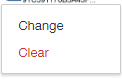
@Tayla - When you click on the already establish signature, does it give you these two other options? 


5 replies

JohnSantos
Guru
Guru
May 29, 2024

@Tayla - When you click on the already establish signature, does it give you these two other options? 


Welcome to the DocuSign Community! Your feedback is highly valued. If you find my response helpful, please give it a "Like" and consider marking it as the "Best Answer" to assist others with similar issues.
Pawan Gangwani
Hero
Hero
May 29, 2024

Hello @Tayla ,

I hope you doing great. As i am understanding correctly you wanted to changes the signature of yours before finishing the signature right?

so simple click on your signature and It will give you 2 options: [ “Change” or “Clear” ]. I am attaching the screenshot for your reference.


Way to Learn | I'd love your feedback | Hit Like | Mark it Best🌈
New Voice
May 29, 2024

is this solution working for you ?

Pawan Gangwani
Hero
Hero
May 30, 2024

Hey, That’s correct this solution works for me. What about you is it working for you?

Way to Learn | I'd love your feedback | Hit Like | Mark it Best🌈
Docusign Employee
June 14, 2024

Hello @zouay and @Tayla ,


If you found the provided response to be a useful solution to your question, please mark it as the best answer by clicking “Select as Best” to make it easier for other users to find.


Best regards,

Nathaly | Docusign Community Moderator
"Select as Best" below if you find the answer a valid solution to your issue!