I’ve created a template and have shared that with select colleagues to use. In order to keep track of when the template has been used by the colleagues I shared it with, from my understanding is I should be able to see that in the History (Template→Elipses→History). However, when I click on history I only see my own use history of that template. I am the owner of the template as well. Is there a step I’m missing? How can I view when the template I have created, shared, and am owner of has been used by the users I’ve shared it with?
Cannot View Entire History of Template that I Own
Best answer by Jenny.Martin
Hello
Thanks for reaching out, and welcome to the Docusign Community!
You’re not missing a step. The history on a template only records actions taken by the template owner. It does not capture usage by users who send envelopes from the shared template.
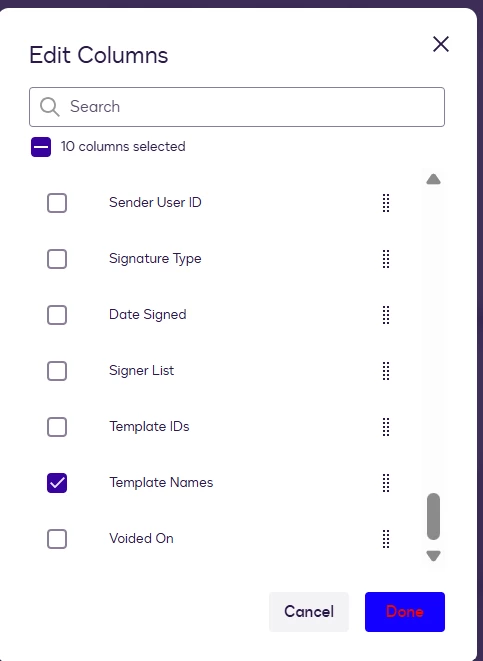
If you are the admin, you can track others who use your template using Reports. To do this, go to Insights > Reports > Envelope Report > Edit Columns > add Template Names > then Run Report

I hope this helps clarify things! If you found this response helpful, feel free to give it a like or mark it as the best answer. Let us know if you have any further questions
Best Regards,
Jenny | Docusign Community Moderator
If this helped, like 👍and mark it as “Best Answer.”
Sign up
Already have an account? Login
You can login or register as either a Docusign customer or developer. If you don’t already have a Docusign customer or developer account, you can create one for free when registering.
Customer Login/Registration Developer Login/RegistrationDocusign Community
No account yet? Create an account
You can login or register as either a Docusign customer or developer. If you don’t already have a Docusign customer or developer account, you can create one for free when registering.
Customer Login/Registration Developer Login/RegistrationEnter your E-mail address. We'll send you an e-mail with instructions to reset your password.
Back to Docusign.com



