Active Voice
May 27, 2025
Solved

Can't find the disconnected Checkbox Groups in Webform....

  • May 27, 2025
  • 2 replies
  • 121 views

When I try to active my webform I get a notification that there are two checkbox groups not connected.  I downloaded the spreadsheet and here are the two groups:  
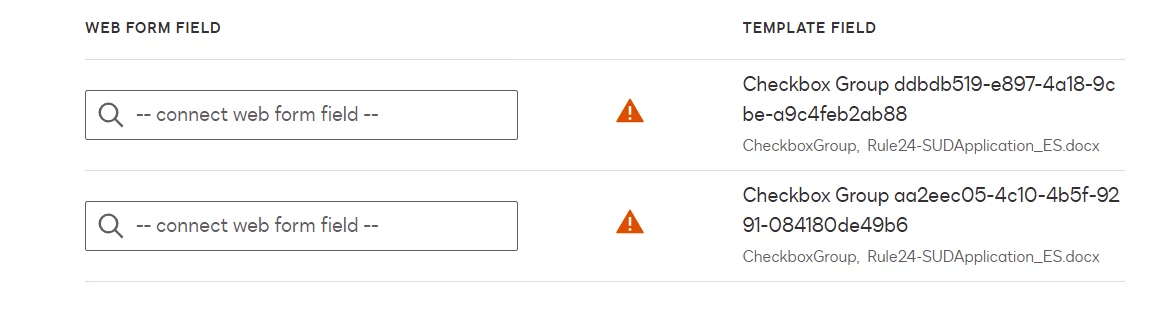
I can’t for the life of me find these two groups on the template’s form fields.  I ignored the warning and activated anyway and then filled out the form.  When I got to the signing page all of the fields were completed properly.  Does anyone have any idea where these two phantom fields are and how I can get rid of them?  I’m attaching the .json file. 

Best answer by Drewcifer

First one is "Check if it is OK for us to send you an email." 

Second is "Check if it is OK for us to contact you by phone."

2 replies

DrewciferEstablished ContributorAnswer
Established Contributor
May 28, 2025

First one is "Check if it is OK for us to send you an email." 

Second is "Check if it is OK for us to contact you by phone."

Docusign Employee
June 4, 2025

Hello ​@Rachael Leyba - Olmsted County,

How are you? Favor, if the solution above helped you or pointed you in the right direction, may you please click Best Answer " so others with similar questions can find it too.

Let us know if we can help with anything else. Wishing you a smooth rest of your day! 


Regards,

Melanie | Docusign Community Moderator
If this helped, feel free to click "Best Answer"!


