Jochen Homborg
New Voice
New Voice
April 16, 2025
Solved

Automatically insert transhipment user entry in mandatory field several times.

  • April 16, 2025
  • 4 replies
  • 97 views

I would like to display the following.
I have a value that occurs e.g. 5 times in the form. (Example credit card number).
 
I lead the user to the first credit card number field using the mandatory field and he fills it in.

The other 4 fields should be filled automatically with the value of the first entry. 

Is that possible?

Many thanks in advance.

Best answer by Vinicius.Rodrigues

Hi ​@Jochen Homborg !

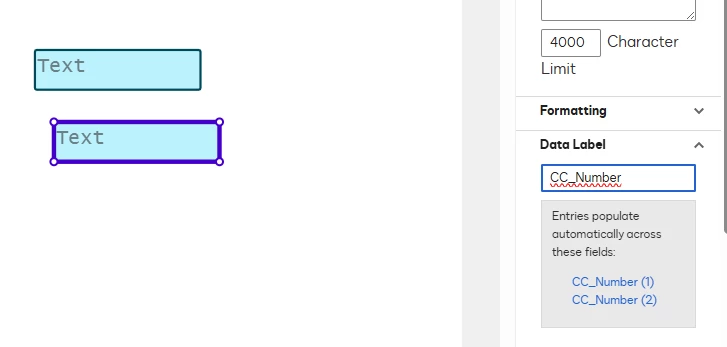
Yes, it’s possible. Do replicate the exact same information, you must keep the Data Label from your Text Field with the exactly same name. When you do that, a message “Entries populate automatically across these fields” will appear. Take a look my example below:


Please, let me know if I was able to help you with this question. If so, could you please select click on the "Select as Best" option? Thank you!

4 replies

Vinicius.Rodrigues
Docusign Employee
Docusign Employee
April 16, 2025

Hi ​@Jochen Homborg !

Yes, it’s possible. Do replicate the exact same information, you must keep the Data Label from your Text Field with the exactly same name. When you do that, a message “Entries populate automatically across these fields” will appear. Take a look my example below:


Please, let me know if I was able to help you with this question. If so, could you please select click on the "Select as Best" option? Thank you!

"Select as Best" below if you find my answer is a valid solution to your issue and mark it as resolved.
Jochen Homborg
New Voice
New Voice
April 16, 2025

HI,  i tried it and ich got the message 

 But when i type an valid entry in the first field (in this case B0009370(1)) the other 6 Field remain empty. Any Idea ?

Jochen Homborg
New Voice
New Voice
April 16, 2025

it works now. it was due to the write protection I set for the “copy” fields. I thought then the content from the first field would only be displayed. but I guess that doesn't work.

Vinicius.Rodrigues
Docusign Employee
Docusign Employee
April 17, 2025

it works now. it was due to the write protection I set for the “copy” fields. I thought then the content from the first field would only be displayed. but I guess that doesn't work.

Hi ​@Jochen Homborg !
Excellent! I'm glad you were able to use the feature! If you need further assistance, just reach out to us. :)

"Select as Best" below if you find my answer is a valid solution to your issue and mark it as resolved.