Newcomer
December 9, 2024
Solved

Automatically Apply Conditional Field Rule to Document Custom Fields

  • December 9, 2024
  • 2 replies
  • 140 views

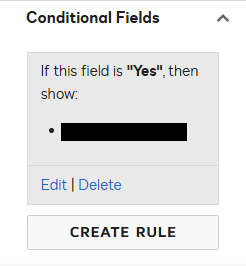
We are using Conga templates to generate Docusign envelope in Salesforce. We successfully applied document custom fields in Conga template using Autoplace Text/”Anchor Tags”. The last thing we need is to setup conditional field rules as per this article (see also image below). However, so far we can add the rules manually. Is there any way to somewhat “save” these rules in Docusign so that those are automatically applied to custom fields? Note that I also plan to ask this on Conga side. Thanks!
Best answer by Alexandre.Augusto

Hello, ​@amr.lub 


You could test using a template created at Docusign’s side. That template can have those fields configured so if using to send an envelope through that template that will work.

I do not known how Conga works, so you can try to check if from their side when creating an envelope at Docusign it’s possible to use a Docusign template.


Best,

Alexandre

2 replies

Alexandre.Augusto
Docusign Employee
Docusign Employee
December 10, 2024

Hello, ​@amr.lub 


You could test using a template created at Docusign’s side. That template can have those fields configured so if using to send an envelope through that template that will work.

I do not known how Conga works, so you can try to check if from their side when creating an envelope at Docusign it’s possible to use a Docusign template.


Best,

Alexandre

Your feedback is very appreciated! You can give a Like and mark this answer as the "Best Answer" for your issue. DocuSign University http://dsucustomers.docusign.com
Docusign Employee
December 31, 2024

​Hi ​@amr.lub,


I hope you are doing well.

I would like to confirm if the suggested solution answers your question?           

If so, please mark it as the best answer by clicking “Select as Best” to make it easier for other users to find. Otherwise, feel free to let me know and I will gladly help you address the situation as soon as possible.


Best regards,   


Alejandro R. | Docusign Community Moderator   

"Select as Best" below if you find the answer a valid solution to your issue!

