Solved

anchor text in dynamic table

  • December 19, 2025
  • 5 replies
  • 83 views

Forum|alt.badge.img+1

Hi together,

I try to set up a delegation of authority log in docusign.

Therfore I have set up a template document including a dynamic table.

I have added this template document to an envelope template with 4 recipient for testing purpose (in the end if I get it to work properly it will be 30-50 recipiencs).

When I use the envelope I uploade a CSV-File to fill the dynamic table with anchor strings which works fine.

However, the replacement of the anchor strings with docusign field seems to be left to chance. The anchor strings in the table are not replaced at all.

If I additionally place the same anchor strings below the table in the template document, the signature anchor strings are recognized in the table too, the fullname-anchor strings are only recognized from the first recipient, but the replacement docusign fields are grouped and the placement is messed up.
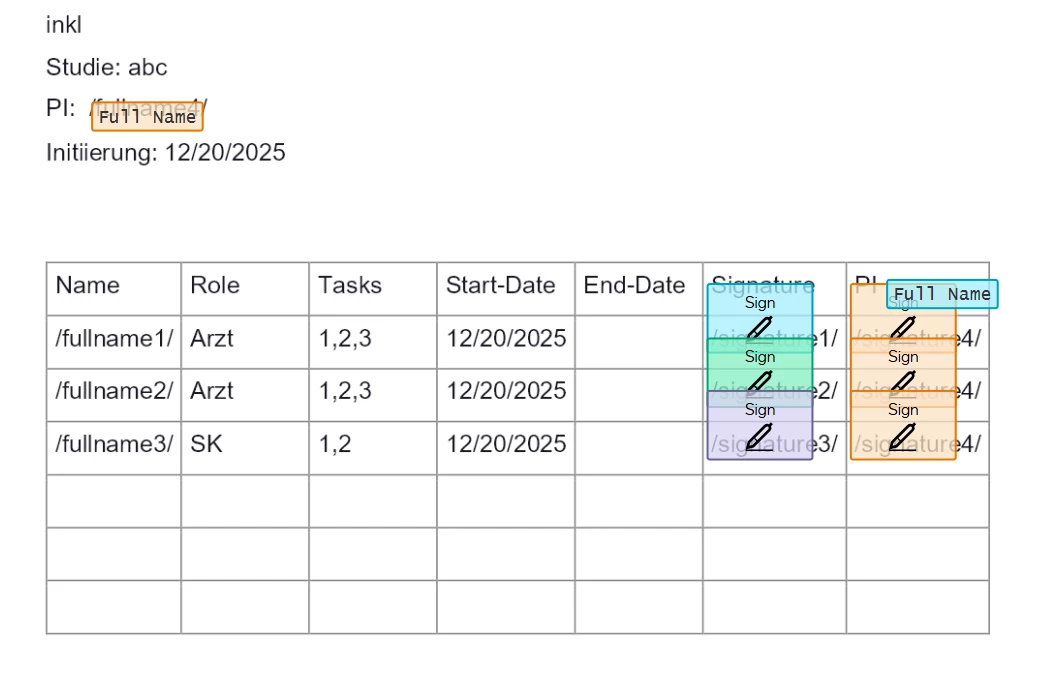
Is there any solution for this?

I do need a table with the fullname and signature of all recipients but the last one, the last one has to sign each row of the table.

Any help would be appreciated.

Thanks in advance.

Best answer by Jenny.Martin

Hello ​@inke,

Thank you for providing a detailed response. As per advice from our team, it would be best if you create a support ticket. This way, our team can review the exact issue and investigate further. 👉 Open a case in the Docusign Support Center


Regards,

Jenny | Docusign Community Moderator

5 replies

Forum|alt.badge.img+14
  • Community Moderator
  • December 25, 2025

Hello ​@inke,

Thanks for reaching out, and welcome to the Docusign Community!

To confirm, were you using Salesforce? If not, can you share a copy of the template or please share a step-by-step of how you’re using it.

We look forward to your response.


Regards,

Jenny | Docusign Community Moderator


Forum|alt.badge.img+1
  • Author
  • New Voice
  • January 2, 2026

Hi Jenny,

thank you for your reply.

I don’t use salesforce. My data are in Excel.

My testing-template looks like shown in the screenshot. I created it within docusign as described in the docusign documentation. Finally I deleted the fullname anchor and replaced it with the full name itself in the upload csv. Using “bulk sending” with just one row ensures that name and signature in one table-row belong to the same recipient. I still have the additional “sign here” anchors for all recipients below the table hided by conditional rule. With the “bulk send” workaround it’s perfectly working in the developer environment.


Workflow:

  • My template document has a dynamic table
  • below the table are anchors for all recipient-roles to link them to the template (/signature1/,/signature2/,...)
  • the anchors below the table are hided by a rule that always comes true
  • My testing envelope template has 4 recipient roles: signer 1-3, signer pi
  • signing order is 1 for signer 1-3 and 2 for signer pi
  • go to “bulk sign”
  • upload a csv with all the information for document generation, recipients and the dynamic table
  • accept missind fields if applicable
  • delete missing recipients if applicable (but don’t delete signer pi)
  • send it


Without the fullname it is working perfectly. I did no further testing with the fullname-anchor.

Sincerely


Forum|alt.badge.img+14
  • Community Moderator
  • Answer
  • January 10, 2026

Hello ​@inke,

Thank you for providing a detailed response. As per advice from our team, it would be best if you create a support ticket. This way, our team can review the exact issue and investigate further. 👉 Open a case in the Docusign Support Center


Regards,

Jenny | Docusign Community Moderator


Forum|alt.badge.img+14
  • Community Moderator
  • January 19, 2026

Hello ​@inke,

I hope you are doing well. I want to confirm if you need further assistance. Feel free to let me know, and I will gladly help you address the situation as soon as possible.


Regards,

Jenny | Docusign Community Moderator


Forum|alt.badge.img+1
  • Author
  • New Voice
  • January 20, 2026

Hi Jenny.Martin,


thanks for asking,

I deleted the fullname anchor. The signature anchor is working very well. My solution is working and very usable.

Thank you.

Sincerely


