New Voice
April 12, 2024
Solved

a black box around the avatar

  • April 12, 2024
  • 16 replies
  • 528 views

After I configured our logo to the Docusign avatar, the signature email sent by Docusign had a black box around the avatar. I tried to remove the black box and tried many methods but couldn't solve it.

Best answer by Vinicius.Rodrigues

Hi @allpo.dev !

Thank you for reporting it, not sure why this option is not available through Manage Profile.


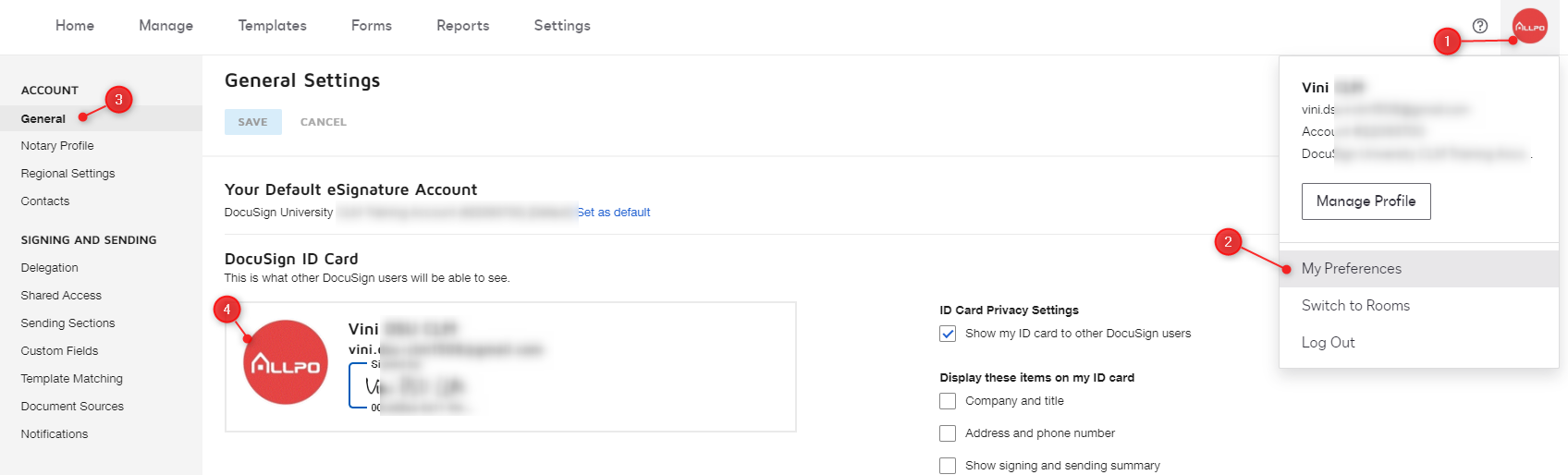
Please, try this way: My Preferences (under Manage Profile) > General > Click on your photo profile. By doing this, you’ll have that option.


16 replies

New Voice
June 4, 2025

Hello @melanie.panguito.

Yes, I confirm that this is the procedure I followed to upload the profile picture. Do you know a way to solve this problem? Thank you.


Docusign Employee
June 4, 2025

Hello ​@rosaspaziani.

Can you please attach the JPG file here? Thanks!


Best,

Melanie | Docusign Community Moderator
Mark this as "Best Answer" if it helped!

New Voice
June 5, 2025

Hello ​@Melanie.Panguito
Here is the file! Thank you very much for your help.

Newcomer
June 12, 2025

Hello, 


I am having the exact same issue where there is black box surrounding profile picture. I have uploaded a JPEG and have also attempted to put a white border around the image, but still no luck - Super frustrating! 


Can someone please take a look?


Docusign Employee
June 19, 2025

Hi ​@rosaspaziani ​@Cadence — thanks for the heads up on this.

It looks like you’ve hit a potential issue. We’ve flagged it for our engineering team, who are actively investigating under ticket ID-9387, and they’re working to get to the root of it. We know bugs can be frustrating, and we apologize for the hassle.

If you'd like to stay in the loop, we suggest opening a support case and referencing the ticket number so you get notified of updates:
👉 Open a Support Case

Here if you need us!

Best,

Melanie | Docusign Community Moderator
If this helped, don’t forget to click “Best Answer”!

Docusign Employee
July 3, 2025

Hello ​@rosaspaziani and ​@Cadence,

Just wanted to update you that the status of this ticket is still open. Engineering team is still working on the fix. As previously mentioned, you can Open a Support Case to receive notifications regarding updates.

Thank you for raising this to us, and we appreciate your patience as we resolve this.


Best,

Melanie | Docusign Community Moderator