Question

Embedded Signing : Focused View : still showing header (Is this actually Focused View?)

  • June 17, 2026
  • 4 replies
  • 124 views

Forum|alt.badge.img+1

Hey Developers,

I am trying to implement the DocuSign Embedded Focused View in a demo project (Just plain HTML and JS, with NodeJS backend), but I've run into an issue where the top header doesn’t go away. 
Screenshot below : 
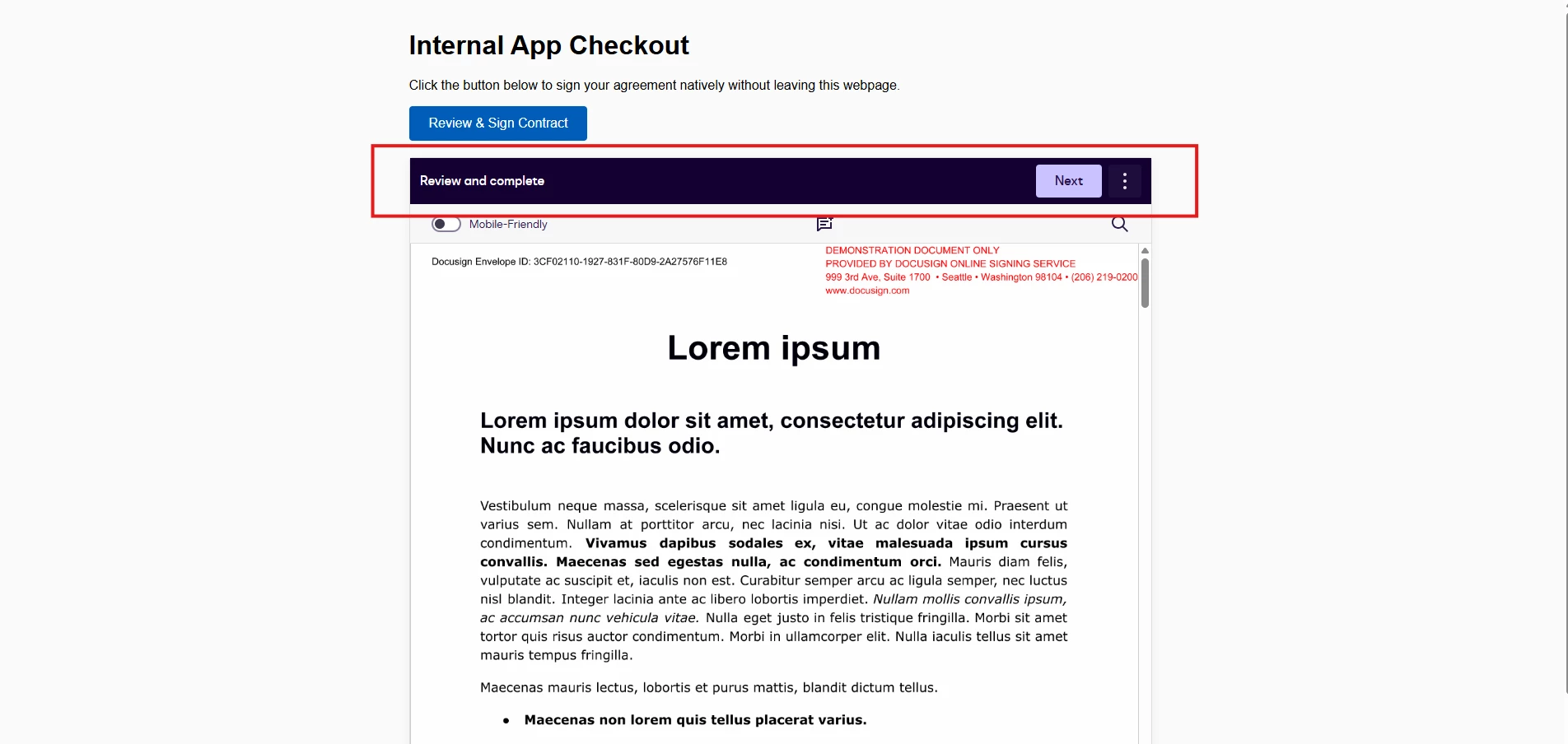
 

I am trying load the signing url in an i-frame.

When looking at the official the Focused View example (here : https://docusign.github.io/app-examples/embedded-signing/) it looks incredibly clean and has no header at all. However, my implementation still looks like the standard embedded signing experience.


Here is what I've done so far:

  • I am using the docusign.js library. (<script src="https://js.docusign.com/bundle.js"></script>)

  • I've set up the configuration object to target my container div.

  • The token and return URLs are generating correctly without throwing backend errors.

Here’s my code snippet :
 

<body>

<div class="signing-wrapper">
<h1>Internal App Checkout</h1>
<p>Click the button below to sign your agreement natively without leaving this webpage.</p>

<button class="btn" id="loadAgreementBtn">Review & Sign Contract</button>

<div id="signing-box"></div>
</div>

<script>
// Check for redirect callback closures
const urlParams = new URLSearchParams(window.location.search);
if (urlParams.get('event') === 'frontend_complete') {
alert("Frontend redirect callback complete!");
}

document.getElementById('loadAgreementBtn').addEventListener('click', async () => {
const button = document.getElementById('loadAgreementBtn');
button.innerText = "Loading Agreement...";
button.disabled = true;

try {
// 1. Fetch data variables from your node backend API
const response = await fetch('/api/get-signing-url', { method: 'POST' });
const data = await response.json();

if (!data.url || !data.integrationKey) {
alert("Configuration Error: Missing signing URL or Integration Key.");
console.error(data);
return;
}

// Unhide the target div container element
document.getElementById('signing-box').style.display = 'block';

// 2. Load DocuSign object explicitly using the fetched Integration Key
const docusign = await window.DocuSign.loadDocuSign(data.integrationKey);

// 3. Configure the Focused View properties inside the exact expected schema
const signingView = docusign.signing({
url: data.url,
"displayFormat": "focused",
"style": {
"branding": {
"primaryButton": {
"backgroundColor": "rgb(0, 0, 0)",
"color": "rgb(255, 255, 255)"
}
},
"signingNavigationButton": {
"finishText": "Submit",
"position": "bottom-right"
},
"signingDeclineButton": {}
}
});

// 4. Mount the clean canvas directly into our div context slot
signingView.mount('#signing-box');

// 5. Catch completion hooks locally
signingView.on('signing_complete', (eventData) => {
console.log('Document signed successfully:', eventData);
document.getElementById('signing-box').innerHTML = "<div style='padding:40px; text-align:center;'><h3>✅ Document Signed Successfully!</h3></div>";
});

} catch (error) {
console.error("Signing sequence initialization broken:", error);
alert("Failed to initialize the clean signature window.");
} finally {
button.innerText = "Review & Sign Contract";
button.disabled = false;
}
});
</script>
</body>

My questions:

  1. Is there a specific property in the JS configuration object I need to pass to explicitly hide the header?

Am I actually rendering the Focused View, or is my code secretly falling back to the standard Classic Embedded Siging view?


Has anyone run into this header issue before? Any guidance on what I might be missing would be greatly appreciated!

Thanks in advance,


4 replies

Forum|alt.badge.img+8

It looks like the classic signing view was rendered instead of the focused view.

I reviewed the code snippet provided, but I don't see any issue with it. One thing to note is that the URL for the JS library is https://js-d.docusign.com/bundle.js for the developer environment and https://js.docusign.com/bundle.js for the production environment.

Could you please check and confirm whether you follow the steps in this article (https://developers.docusign.com/docs/esign-rest-api/how-to/request-signature-focused-view/) to create the recipient view URL for the focused view?
As explained in step 4, you should specify the frameAncestors and the messageOrigins property in the CreateRecipientView API to correctly render the focused view.

Please review every step of the above article and compare it with your implementation.


Forum|alt.badge.img+1
  • Author
  • New Voice
  • June 19, 2026

Hi ​@Byungjae.Chung 
I have followed the same documentation that you provided the link of. I have also provided frameAncestors  and messageOrigins both in the CreateRecipientView API. I am still not sure what mistake i am doing here. 
Would be glad if someone could help here. 

I am adding the server.js here .

process.env.NODE_TLS_REJECT_UNAUTHORIZED = "0";
const express = require('express');
const bodyParser = require('body-parser');
const path = require('path');
const http = require('https');

const app = express();
const PORT = 3000;
const fs = require('fs').promises;

async function convertPdfToBase64() {
try {
const filePath = path.join(__dirname, 'sample3.pdf');

// 1. Read the file into a raw binary Buffer
const fileBuffer = await fs.readFile(filePath);

// 2. Convert the Buffer directly into a Base64 string
const base64String = fileBuffer.toString('base64');

console.log("Success! Base64 String length:", base64String.length);
let cleanBase64 = base64String.replace(/[\r\n\s]/g, '');
return cleanBase64;
} catch (error) {
console.error("Error reading or converting the PDF:", error);
}
}

// Expose public URL for webhook parsing (Accepts raw text/JSON from DocuSign)
// 1. Parse standard JSON payloads
app.use(express.json());

// 2. Add a fallback wildcard parser to handle any variations DocuSign sends
app.use(express.json({
type: function (req) {
// Automatically treats any webhook containing 'json' as parseable text
return req.headers['content-type'] && req.headers['content-type'].includes('json');
}
}));
app.use(bodyParser.urlencoded({ extended: true }));

// Configuration Variables - PASTE YOUR KEYS HERE
const ACCESS_TOKEN = "eyJ0eXAiOiJNVCIsImFsZyI6IlJTMjU2Iiwia2lkIjoiNjgxODVmZjEtNGU1MS00Y2U5LWFmMWMtNjg5ODEyMjAzMzE3In0.AQsAAAABAAUABwCAX9TD4c3eSAgAgJ_30STO3kgCADXMX3FK0z9Blpd-8B2WUgUVAAEAAAAYAAEAAAAFAAAADQAkAAAAZTcxNmJlMjEtNGUzOS00ZWU5LTlkYzQtY2FmMDEzMzNkM2VlIgAkAAAAZTcxNmJlMjEtNGUzOS00ZWU5LTlkYzQtY2FmMDEzMzNkM2VlEgABAAAACwAAAGludGVyYWN0aXZlMACAMqPC4c3eSDcARPAESWvph0ap5Qamxempfg.tzSl-icWgEXCN16PPHs7w53rOIoobccfcs2nA-vKmIY9Y3Ss61KdrQzykDT_3SY8u-Z5-YcJ62oiU2xwr8rMZirwDhxqVyCDqwDfvqadzsCv4l9UMsjki3WLsV-q6iTqZzPYuqXRcWjD-cCrym72icGJATBRirGwxS_U_SVJe4qQt8e-ziWF85rhz27rL-AGtKqDM5xkPXfETRxB7fw0znUOsFAvxuNVAx0ggtEN8i-5RRpbP191PJsiQWfXb9qpBNlUnVBvNvXdGf_i1JHS3SttM22NywUmeGO1vY1psIdJo_qNHUf8pIyUBKMdo3gAPuf89CmWuG8jG0FjUkaLpw";
// Change this line:
const BASE_URL = "demo.docusign.net";
const ACCOUNT_ID = "4dedb3b4-f389-4c50-aa83-bb439927fde6"
const INTEGRATION_KEY = "e716be21-4e39-4ee9-9dc4-caf01333d3ee"

// A solid 1-page test PDF payload array


// Serve the frontend index.html page
app.get('/', (req, res) => {
res.sendFile(path.join(__dirname, 'index.html'));
});

// Helper function to manage outbound HTTPS requests to DocuSign
function makeRequest(options, postData) {
return new Promise((resolve, reject) => {
const req = http.request(options, (res) => {
let data = '';
res.on('data', chunk => data += chunk);
res.on('end', () => resolve(JSON.parse(data)));
});
req.on('error', err => reject(err));
req.write(JSON.stringify(postData));
req.end();
});
}

// ENDPOINT 1: Triggers the sequence to create an envelope and return a signing URL
app.post('/api/get-signing-url', async (req, res) => {
try {
// Capture the public URL assigned to your server dynamically via the headers
const hostUrl = `https://${req.get('host')}`;
const PDF_BASE64 = await convertPdfToBase64();

// Payload A: Create the Envelope containing an embedded listener & eventNotification webhook
const envelopePayload = {
"emailSubject": "Please sign this document natively",
"autoNavigation": "true",
"documents": [{
"documentBase64": PDF_BASE64,
"documentId": "1",
"fileExtension": "pdf",
"name": "Contract.pdf"
}],
"recipients": {
"signers": [{
"email": "test-user@example.com",
"name": "Jane Doe",
"recipientId": "1",
"routingOrder": "1",
"clientUserId": "7777", // Captive embedded user flag
"tabs": {
"signHereTabs": [{
"anchorString": "/s1/", // DocuSign searches your PDF for this exact text
"anchorXOffset": "20", // Moves the box slightly right of the text
"anchorYOffset": "-15", // Adjusts vertical positioning
"anchorUnits": "pixels",
"optional": "false", // ⚠️ CRITICAL: "false" forces them to sign before finishing!
"scaleValue": "1"
}]
}
}]
},
"status": "sent",
"eventNotification": {
"url": `${hostUrl}/webhook/docusign`, // Tells DocuSign where to post updates
"loggingEnabled": "true",
"envelopeEvents": [
{ "envelopeEventStatusCode": "completed" },
{ "envelopeEventStatusCode": "declined" }
],
"recipientEvents": [
{ "recipientEventStatusCode": "Completed" },
{ "recipientEventStatusCode": "Declined" }
],
"includeDocumentFields": "false"
}
};

const envOptions = {
host: BASE_URL,
path: `/restapi/v2.1/accounts/${ACCOUNT_ID}/envelopes`,
method: 'POST',
headers: {
'Authorization': `Bearer ${ACCESS_TOKEN}`,
'Content-Type': 'application/json'
}
};

const envelopeResponse = await makeRequest(envOptions, envelopePayload);
console.log("1. Envelope Response Details:", envelopeResponse); // <--- ADD THIS LINE
const envelopeId = envelopeResponse.envelopeId;

if (!envelopeId) {
return res.status(400).json({ error: "Failed to create envelope", details: envelopeResponse });
}

// Payload B: Request the Recipient View token link using the fresh envelopeId
const viewPayload = {
"authenticationMethod": "None",
"clientUserId": "7777",
"userName": "Jane Doe",
"email": "test-user@example.com",
"returnUrl": `${hostUrl}/?event=frontend_complete`,
"frameAncestors": [
"https://apps-d.docusign.com", // Allows the internal frame engine validation route
hostUrl // Whitelists your specific public ngrok/tunnel URL domain!
],
"messageOrigins": [
hostUrl
],
"settings": {
"signingUiMode": "focused" // Strips out workflow action buttons like 'Finish Later'
}
};

const viewOptions = {
host: BASE_URL,
path: `/restapi/v2.1/accounts/${ACCOUNT_ID}/envelopes/${envelopeId}/views/recipient`,
method: 'POST',
headers: {
'Authorization': `Bearer ${ACCESS_TOKEN}`,
'Content-Type': 'application/json'
}
};

const viewResponse = await makeRequest(viewOptions, viewPayload);

console.log("res", viewResponse);

// Return both the signing URL and the key identifiers back to the frontend frame
res.json({ url: viewResponse.url, integrationKey: INTEGRATION_KEY });

} catch (error) {
console.error("DocuSign API Failure:", error);
res.status(500).json({ error: error.message });
}
});

// ENDPOINT 2: The Webhook Receiver. DocuSign hits this asynchronously.
app.post('/webhook/docusign', (req, res) => {
let rawData = '';

// Collect the text packets directly from the network stream
req.on('data', (chunk) => {
rawData += chunk;
});

req.on('end', () => {
if (!rawData) {
console.log("❌ Received an empty webhook stream.");
return res.status(400).send("No data");
}

let envelopeId = null;
let status = null;

// Diagnostic Check: Determine what format DocuSign actually delivered
const isXml = req.headers['content-type'] && req.headers['content-type'].includes('xml');

console.log(rawData);
if (isXml) {
// 1. XML Mode: Use regex patterns to isolate the values between the tags
const envelopeMatch = rawData.match(/<EnvelopeId>([^<]+)<\/EnvelopeId>/i);
const statusMatch = rawData.match(/<Status>([^<]+)<\/Status>/i);

envelopeId = envelopeMatch ? envelopeMatch[1] : null;
status = statusMatch ? statusMatch[1] : null;
} else {
// 2. JSON Mode Fallback: Standard object parsing
try {
const parsed = JSON.parse(rawData);
envelopeId = parsed.envelopeId;
status = parsed.status;
} catch (e) {
// Fail silently if JSON is malformed
}
}

// ==========================================
// PROCESSED LOG OUTPUT
// ==========================================
console.log("----------------------------------------");
console.log(`🚀 WEBHOOK RECEIVED (Format: ${isXml ? 'XML' : 'JSON'})`);
console.log(`Extracted Envelope ID: ${envelopeId}`);
console.log(`Extracted Status: ${status}`);
console.log("----------------------------------------");

if (status && status.toLowerCase() === 'completed') {
console.log("✅ SUCCESS: Webhook parsed successfully! Update your database now.");
}
if (status && status.toLowerCase() === 'declined') {
console.log("❌ CANCELLED: Webhook caught a DECLINED status. Updating database to REJECTED.");
}

// Always return 200 OK to prevent DocuSign from retrying
res.status(200).send("Received");
});
});

app.listen(PORT, () => {
console.log(`Server executing locally at http://localhost:${PORT}`);
});


Forum|alt.badge.img
  • Docusign Employee
  • June 25, 2026

Hi ​@catrose,

Nice clean implementation – you’re very close here. A couple of small wiring details can cause Focused View to silently fall back to the classic embedded UI (with the header), so I’d suggest checking these points:

  1. JS bundle vs environment

You’re calling the API against demo.docusign.net, but in your HTML you’re loading:

<script src="https://js.docusign.com/bundle.js"></script>

For the developer (demo) environment, can you try switching this to:

<script src="https://js-d.docusign.com/bundle.js"></script>

Then keep demo.docusign.net as your REST base URL. In production you’d switch both: use the prod base URL and https://js.docusign.com/bundle.js.

  1. messageOrigins and frameAncestors

In your CreateRecipientView payload you have:

"frameAncestors": [
"https://apps-d.docusign.com",
hostUrl
],
"messageOrigins": [
hostUrl
],
"settings": {
"signingUiMode": "focused"
}

The focused view guide expects:

  • frameAncestors to include your app origin and https://apps-d.docusign.com (for demo).
  • messageOrigins to be only the DocuSign apps origin.

Can you try updating it like this:

const viewPayload = {
authenticationMethod: "None",
clientUserId: "7777",
userName: "Jane Doe",
email: "test-user@example.com",
returnUrl: `${hostUrl}/?event=frontend_complete`,
frameAncestors: [
hostUrl, // your app origin
"https://apps-d.docusign.com" // demo focused view origin
],
messageOrigins: [
"https://apps-d.docusign.com"
],
settings: {
signingUiMode: "focused"
}
};

After that:

  • First, open the viewResponse.url directly in a browser (no iframe) and confirm it shows the minimal Focused View shell (no classic header).
  • Then embed that URL using DocuSign JS with displayFormat: "focused" as you already do.
  1. Account settings (optional check)

If it still looks like classic view after the above:

  • Can you check whether Document Visibility is turned off on the account? Focused View / Click-to-Agree need that setting disabled.
  • Also confirm you’re not using any unusual/standards-based signature types in this envelope while testing; try with a simple “standard” signature first.

If you’re still seeing the header after trying the above, it would help to grab:

  • The exact CreateRecipientView JSON (without access token),
  • A screenshot of what you see when you open viewResponse.url directly,
  • And the browser console log.

Post those here and we can dig a bit deeper.


Forum|alt.badge.img+1
  • Author
  • New Voice
  • June 25, 2026

Hi ​@Mason 
Thanks a lot for helping here. It is working as expected now.


