Legacy User
May 1, 2021
Solved

How do you edit a document after it's been sent for signature?

  • May 1, 2021
  • 1 reply
  • 2215 views

Document has been sent out for signature but the customer hasn't signed yet and I need to make a change. There's no clear way to do this when I try to access the document.

Best answer by Community Expert
  1. Go to the Manage tab at the top of the screen
  2. Click on your Sent folder in the left side
  3. Find the envelope in your list
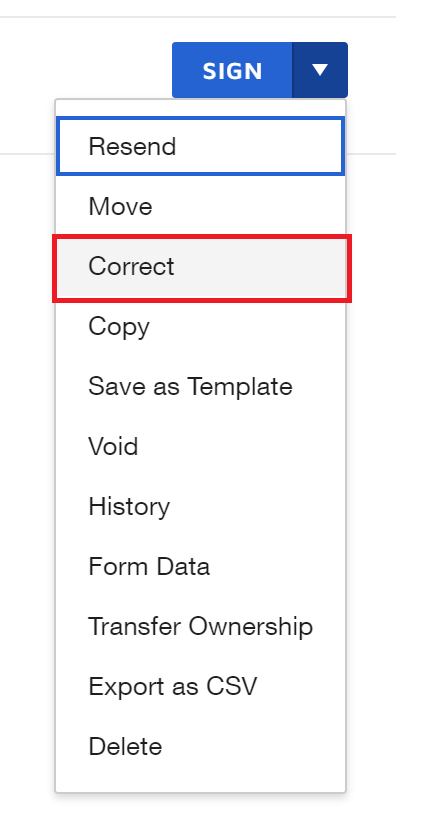
  4. Click the Arrow on the action button at the right end of the row and select Correct from the dropdown
  5. Make any changes needed (recipients, documents, fields, etc.)
  6. Click the CORRECT button to save the changes (you may need to click the NEXT button first if you're still on the page where you manage documents and recipients).

Correct Action Button

1 reply

Docusign Employee
May 2, 2021
  1. Go to the Manage tab at the top of the screen
  2. Click on your Sent folder in the left side
  3. Find the envelope in your list
  4. Click the Arrow on the action button at the right end of the row and select Correct from the dropdown
  5. Make any changes needed (recipients, documents, fields, etc.)
  6. Click the CORRECT button to save the changes (you may need to click the NEXT button first if you're still on the page where you manage documents and recipients).

Correct Action Button