Solved

Narrow down signature type

  • April 21, 2026
  • 3 replies
  • 72 views

Forum|alt.badge.img+2

Hello, 

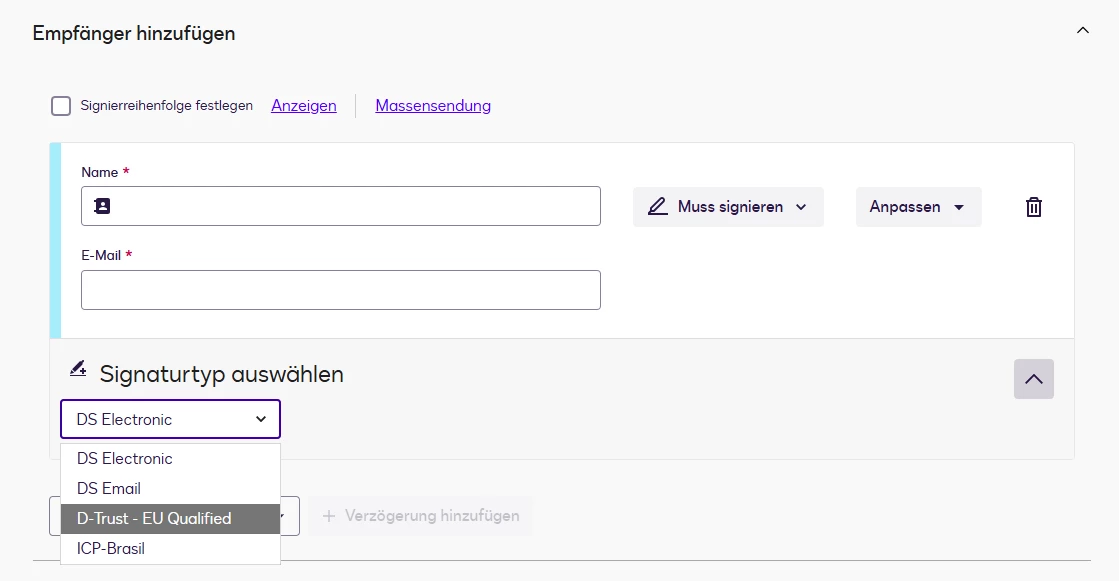
Is there a way for me to restrict the signature type for users? We don’t want everyone to be able to select the qualified signature on behalf of someone else.

Thank you,


Best answer by Luke.Cervantes

Hello ​@Mario B.,


Thank you for the clarification. I understand you need more granular control over who can utilize the QES signature type.


Currently, there is no user-level setting to restrict signature types to selective users on your account. The steps previously provided will apply to all your users/senders for their envelopes.


As a workaround, I recommend utilizing the creation of a sub-account where QES is not enabled. By adding those specific users to this non-QES sub-account, you can effectively manage their signing authorizations while keeping the primary account restricted to QES-authorized users.


Please note that creating a sub-account requires an active organization and the cooperation of an Organization Administrator.


For more information on setting up sub-accounts, please refer to the article "Create a New Account."


I hope this helps! Please let me know if you have any further questions.


Best Regards,


Luke | Docusign Community Moderator

If this helped, feel free to Like👍and click "Best Answer."

3 replies

Forum|alt.badge.img+3
  • Community Moderator
  • April 22, 2026

Hello ​@Mario B.,

Thanks for reaching out here in the Docusign Community—great to have you here! We understand that you want to restrict your users from using your Qualified Electronic Signature for your envelope. We'll do our best to help!
 

An Administrator of the account can remove the signature type as an option for your envelope's authentication. To do these, please follow these steps:

  1. Go to the Admin tab, on the left panel, select Signature Types.
  2. Select Edit.
  3. The Manage Signature Type List screen opens.
  4. Locate a signature type you want to remove.

Important: In some cases, it's possible that Docusign has assigned you signature types. If you delete these signature types, you won't be able to restore them unless you contact Docusign Support.

  • Select Remove.
  • Repeat steps 3 and 4 for each signature type you want to remove.
  • Select Save.

A confirmation message shows on the Signature Types screen. The list of signature types is now up to date.

You may refer to this link for more information:

Remove Signature Types


Please note that this change will be effective for all users/senders of the account, as this change is an account-level setting.


If you found the response to be a useful solution to your question, please "like" and mark it as the best answer by clicking "Select as Best" to make it easier for other users to find. Thank you!

Feel free to follow up if anything's unclear—we're here to help!


— Luke | Docusign Community Moderator

If this helped, mark it as "Best Answer" so others can find it too!


Forum|alt.badge.img+2
  • Author
  • Active Voice
  • April 23, 2026

Hello Luke,

thank you for your answer.

That´s what I already found. I don´t want to remove the signature typ. 

I would like certain people to be given the authorisation to select the QES. Is that possible?

Thank you.

Best regards

Mario


Forum|alt.badge.img+3
  • Community Moderator
  • Answer
  • April 23, 2026

Hello ​@Mario B.,


Thank you for the clarification. I understand you need more granular control over who can utilize the QES signature type.


Currently, there is no user-level setting to restrict signature types to selective users on your account. The steps previously provided will apply to all your users/senders for their envelopes.


As a workaround, I recommend utilizing the creation of a sub-account where QES is not enabled. By adding those specific users to this non-QES sub-account, you can effectively manage their signing authorizations while keeping the primary account restricted to QES-authorized users.


Please note that creating a sub-account requires an active organization and the cooperation of an Organization Administrator.


For more information on setting up sub-accounts, please refer to the article "Create a New Account."


I hope this helps! Please let me know if you have any further questions.


Best Regards,


Luke | Docusign Community Moderator

If this helped, feel free to Like👍and click "Best Answer."