I want to update the attribute in CLM with the pending signatory or signatories. At wait for signature step getting the updated audit logs.
Example: There are 4 signers for the agreement. Initially, I can update the status to show that the signature is pending from all 4. However, if the first signer signs the contract, I want the attribute to be updated, indicating that the signature is still pending from the remaining 3 signers and same will continue.
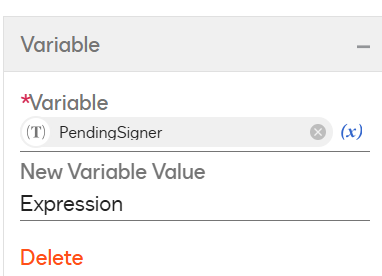
I Build one way around to achieve this requirement. In the wait for signature step, I take path of “updated” and route to “Update variable step”. Where I store all “RecipientEmails" and the “RecipientSignedEmails” values from the “AuditXML” which I sorted in “Wait for Signature” step. then create variable named “pendingSigners” and use the c# to compare both of them.
Here is the C# code:
var a = GetVariableValue("RecipientEmail"); var b = GetVariableValue("RecipientSignedEmail");
var emails = a.Split(','); var signedEmails = b.Split(',');
// Convert all emails to lowercase and trim spaces for (int i = 0; i < emails.Length; i++) { emails[i] = emails[i].Trim().ToLower(); } for (int i = 0; i < signedEmails.Length; i++) { signedEmails[i] = signedEmails[i].Trim().ToLower(); }
// Manually filter out signed emails var result = ""; for (int i = 0; i < emails.Length; i++) { bool isSigned = false;
// Check if the current email exists in signedEmails for (int j = 0; j < signedEmails.Length; j++) { if (emails[i] == signedEmails[j]) { isSigned = true; break; } }
// If email is not in signedEmails, add it to result if (!isSigned) { if (result != "") { result += ","; } result += emails[i]; } }
// Return the final filtered list return result;
Way to Learn | I'd love your feedback | Hit Like | Mark it Best🌈
I Build one way around to achieve this requirement. In the wait for signature step, I take path of “updated” and route to “Update variable step”. Where I store all “RecipientEmails" and the “RecipientSignedEmails” values from the “AuditXML” which I sorted in “Wait for Signature” step. then create variable named “pendingSigners” and use the c# to compare both of them.
Here is the C# code:
var a = GetVariableValue("RecipientEmail"); var b = GetVariableValue("RecipientSignedEmail");
var emails = a.Split(','); var signedEmails = b.Split(',');
// Convert all emails to lowercase and trim spaces for (int i = 0; i < emails.Length; i++) { emails[i] = emails[i].Trim().ToLower(); } for (int i = 0; i < signedEmails.Length; i++) { signedEmails[i] = signedEmails[i].Trim().ToLower(); }
// Manually filter out signed emails var result = ""; for (int i = 0; i < emails.Length; i++) { bool isSigned = false;
// Check if the current email exists in signedEmails for (int j = 0; j < signedEmails.Length; j++) { if (emails[i] == signedEmails[j]) { isSigned = true; break; } }
// If email is not in signedEmails, add it to result if (!isSigned) { if (result != "") { result += ","; } result += emails[i]; } }
// Return the final filtered list return result;
Translate
Way to Learn | I'd love your feedback | Hit Like | Mark it Best🌈
You can login or register as either a Docusign customer or developer. If you don’t already have a Docusign customer or developer account, you can create one for free when registering.
You can login or register as either a Docusign customer or developer. If you don’t already have a Docusign customer or developer account, you can create one for free when registering.
 Back to Docusign.com