Conversation Starter
July 7, 2025
Solved

Is there a way to mass update a single attribute across contracts?

  • July 7, 2025
  • 13 replies
  • 343 views

I have several thousand agreements in my CLM.  There is a new Attribute I am being asked to track across them all that was not entered when we migrated them into the system.  I have the new values for all of the agreements in an excel file.  Is there any way to upload a change to enter values to Attributes across many contracts at the same time?  It is prohibitive to go into each contract and add this Attribute one at a time.  It would take far too long.

Best answer by Michael.Rave
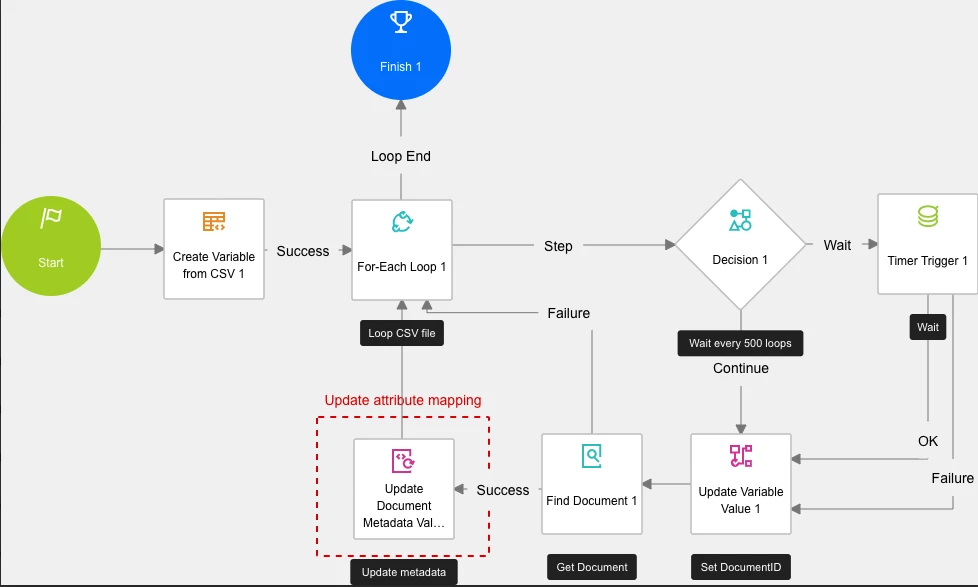
Example workflow to achieve a bulk update of attributes based on a CSV file.


13 replies

Docusign Employee
September 24, 2025

Interesting! When I set up the workflow in my own account and a run a small sample file, I’m able to get the “Find Document” step to work successfully for every Id in my CSV. One thought you could do is build a failure path from the “Find Document” step which routes back up to the For Each Loop step. That way you can see if it fails on every ID or just a few. 

I don’t think this is the issue but one minor thing I see is the vStepCounter variable in the Update Variable Value 2 step should be incrementing by (roughly) the number of steps being processed in each loop, not set to a static 0. To do that, change vStepCounter to a Number type (right now it’s text). Using the expression builder, set the value of vStepCounter to: Convert.ToInt32(GetVariableValue("vStepCounter")) + 5.


Kelly Gatling | Principal Product Trainer | Docusign University
Conversation Starter
October 5, 2025

Thanks Kelly!  So, to make it slimmer I removed the timer section altogether and I am just doing these in smaller batches to compensate.  After that and a couple of other tweaks mentioned above, the workflow now works, but only for the first row of the csv file.  No matter what I do, it won’t continue the loop to subsequent rows.  I even added a step for “Next Loop” and tied it back to the “For-Each Loop” step, but no go.  I have double-checked the csv file and it does not contain any hidden spaces or lines and no extra commas at the end of lines when checking via a word editor.  I have double-checked the variables and everything looks right, including when I check the iterator variable.  I’m at a loss as to how to move it along the list.

Docusign Employee
October 13, 2025

If it doesn’t loop to the next row than it could be an issue with the iterator variable. Your workflow looked right before, I would make sure you are always referencing the iterator variable over anything else because that tells the workflow what to loop on. 

Kelly Gatling | Principal Product Trainer | Docusign University