Conversation Starter
May 29, 2025
Solved

How to Attach Docs using DocGen Form?

  • May 29, 2025
  • 11 replies
  • 278 views

Hello everyone

I hope you are well

I work with CLM and develop workflow for our clients. A lot of them say that they want an attachment field in the docgen form, and I have used it so far. The problem is:
- When using an eForms, its always easy to find an attachment using the step Find Attachments, but with the docgen form, this step doesn't seem to work.

In the related documents field when you open the document generated, there are no attachs.
Does anyone know why? What can I do to automatically attach the documents?

Thanks

Best answer by Pawan Gangwani

Hello ​@Matheus Cardoso 

Welcome to the DocuSign Community!

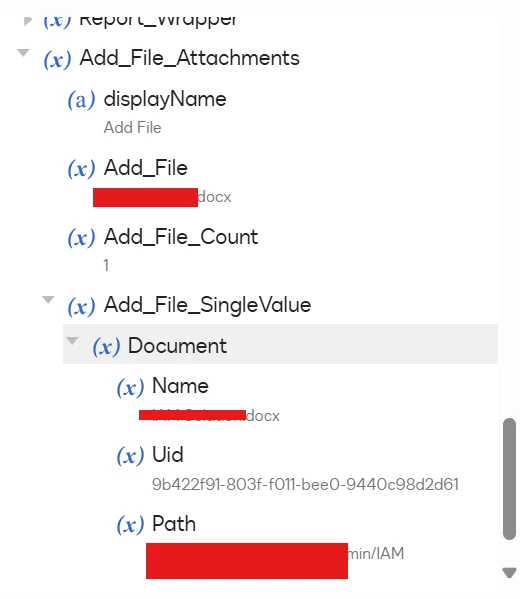
When you're using an Attachment field in a DocGen form, the attached document will be stored within the workflow variable called params (as shown in the screenshot I’ve included).


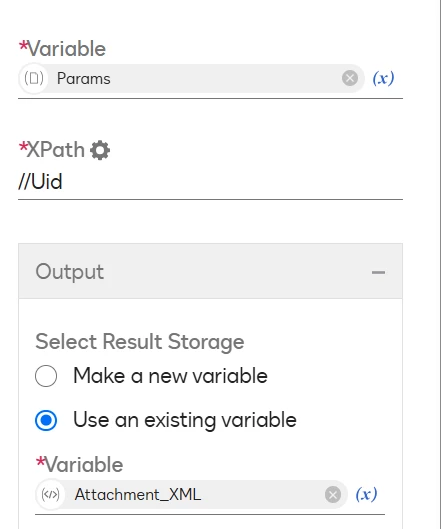
Now, to retrieve and work with the attached document inside the workflow, you can use the "Evaluate XPath" step. This will allow you to locate the attached document within the params structure just like I typically do in similar use cases.
 

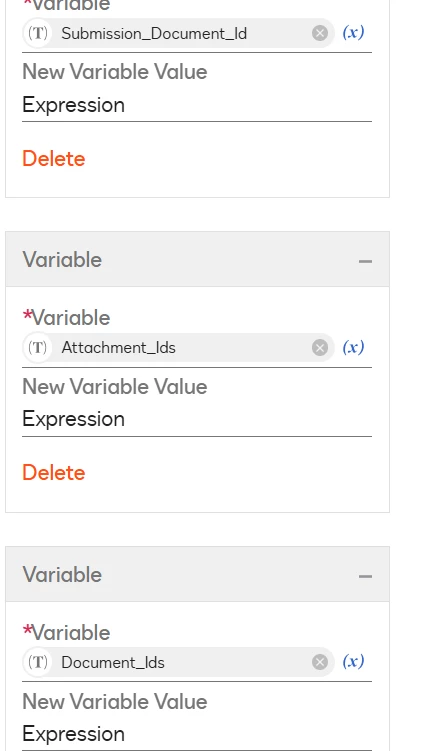
Once you've found the attached document's ID and the submission document's ID, you can then combine them using a C# script step (also illustrated in the screenshot I’ve shared). This enables you to treat the attachment as part of the generated document and handle it seamlessly in the rest of your workflow.

Let me know if you’d like a sample XPath or C# snippet for this happy to help!

Thanks!

👪 DocuSign Community Leaderboard Top 5 contributor
💹 Ranked #3 in the Reply Royalty category in DocuSign Community Wrapped 2024
🤝Let’s LinkedIn and rollPawan Gangwani - EY | LinkedIn

11 replies

Pawan Gangwani
Hero
Hero
June 20, 2025

That’s a bummer, it didn’t work as expected. 

Hello ​@rodvillani 

I tested on my Dev account, and it worked. Can you tell me which “Document” you are selecting in “Update Document Metadata” step. For information you need to select “Document_Ids” to make it related. I have explained it above to combine both in “Document Id” and use this. It will work 100%.
 

Thanks!

👪 DocuSign Community Leaderboard Top 5 contributor
💹 Ranked #3 in the Reply Royalty category in DocuSign Community Wrapped 2024
🤝Let’s LinkedIn and rollPawan Gangwani - EY | LinkedIn

Way to Learn | I'd love your feedback | Hit Like | Mark it Best🌈