mshealy
Established Contributor
August 16, 2024
Solved

email body needs to include a link to the envelope task

How can i get a link to the envelope task in the email body so that people that are assigned to the task can go right to the task or to the document?

Pawan Gangwani
Hero
August 20, 2024

Okay Understood,

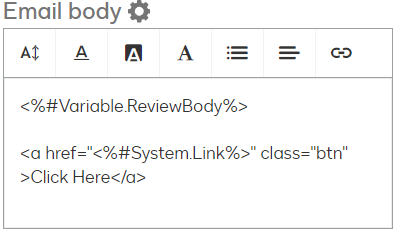
Try this one: <a href="<%#System.Link%>" class="btn" >Task</a> 
and paste it on the different line like shown in SS below:


Way to Learn | I'd love your feedback | Hit Like | Mark it Best🌈

12 replies

Pawan Gangwani
Hero
Hero
August 16, 2024

Hello @mshealy 

I hope you are doing great. When ever we want attach then link in the email body for associated task we use “System Link”  variable which is <%#System.Link%> and if you wanna customize link for email body appearance. use this syntax.

<a href=”<%#System.Link%>” class=”btn” >Task</a> 

What ever you write at the place of “Task” will appear the same.

Thanks! Hope this helps.

Translate
Way to Learn | I'd love your feedback | Hit Like | Mark it Best🌈
mshealy
Established Contributor
mshealyEstablished ContributorAuthor
Established Contributor
August 16, 2024

@Pawan Gangwani where can i find documentation on this?

Translate
Denise
mshealy
Established Contributor
mshealyEstablished ContributorAuthor
Established Contributor
August 16, 2024

Hello @mshealy 

I hope you are doing great. When ever we want attach then link in the email body for associated task we use “System Link”  variable which is <%#System.Link%> and if you wanna customize link for email body appearance. use this syntax.

<a href=”<%#System.Link%>” class=”btn” >Task</a> 

What ever you write at the place of “Task” will appear the same.

Thanks! Hope this helps.

The “Task” showed in the email but with no link.  just text appeared in the email.

Translate
Denise
Pawan Gangwani
Hero
Hero
August 16, 2024

Hello @mshealy 

I hope you are doing great. When ever we want attach then link in the email body for associated task we use “System Link”  variable which is <%#System.Link%> and if you wanna customize link for email body appearance. use this syntax.

<a href=”<%#System.Link%>” class=”btn” >Task</a> 

What ever you write at the place of “Task” will appear the same.

Thanks! Hope this helps.

The “Task” showed in the email but with no link.  just text appeared in the email.

Yes, If you click on that “Task” button will take you to the task screen, and which has link embedded. if you want the link then only use (<%#System.Link%>).

Not sure about the article or documentation. 


Translate
Way to Learn | I'd love your feedback | Hit Like | Mark it Best🌈
mshealy
Established Contributor
mshealyEstablished ContributorAuthor
Established Contributor
August 16, 2024

@Pawan Gangwani where can i find documentation on this?

Where can i find documentation on this?

Translate
Denise
Pawan Gangwani
Hero
Hero
August 18, 2024

@Pawan Gangwani where can i find documentation on this?

Where can i find documentation on this?

Oh i have mentioned above, in case you missed it. “Not sure about the article or documentation”.

But if I find it then I will share with you.

Translate
Way to Learn | I'd love your feedback | Hit Like | Mark it Best🌈
mshealy
Established Contributor
mshealyEstablished ContributorAuthor
Established Contributor
August 19, 2024

when i use <%#System.Link%> it shows the link and works.

if i use <a href=”<%#System.Link%>” class=”btn” >Task</a>, it shows task but doesn’t go anywhere when you select “Task”, in other words, no hyperlink.

Translate
Denise
mshealy
Established Contributor
mshealyEstablished ContributorAuthor
Established Contributor
August 19, 2024

@Pawan Gangwani where can i find documentation on this?

Where can i find documentation on this?

Oh i have mentioned above, in case you missed it. “Not sure about the article or documentation”.

But if I find it then I will share with you.

This is what i have found… but it doesn’t show system.link
https://support.docusign.com/s/document-item?bundleId=yks1643320936212&topicId=aqe1623370489135.html&_LANG=enus

Translate
Denise
Pawan Gangwani
Hero
Hero
August 19, 2024

when i use <%#System.Link%> it shows the link and works.

if i use <a href=”<%#System.Link%>” class=”btn” >Task</a>, it shows task but doesn’t go anywhere when you select “Task”, in other words, no hyperlink.

<a href="<%#System.Link%>" class="btn" >Task</a> 

This should work, are you putting this into eform or directly into the step “Task Assignment Email” ?

Translate
Way to Learn | I'd love your feedback | Hit Like | Mark it Best🌈
mshealy
Established Contributor
mshealyEstablished ContributorAuthor
Established Contributor
August 20, 2024

when i use <%#System.Link%> it shows the link and works.

if i use <a href=”<%#System.Link%>” class=”btn” >Task</a>, it shows task but doesn’t go anywhere when you select “Task”, in other words, no hyperlink.

<a href="<%#System.Link%>" class="btn" >Task</a> 

This should work, are you putting this into eform or directly into the step “Task Assignment Email” ?

Directly into the Task Email.

Translate
Denise