Newcomer
June 7, 2024
Solved

How do we get the Summary doc included when the signed documents are sent to us?

  • June 7, 2024
  • 2 replies
  • 1912 views

We want a recipient (and us) to receive not only the signed document, but also the Summary sheet.  Is there a setting to have that included by default?

Best answer by JohnSantos

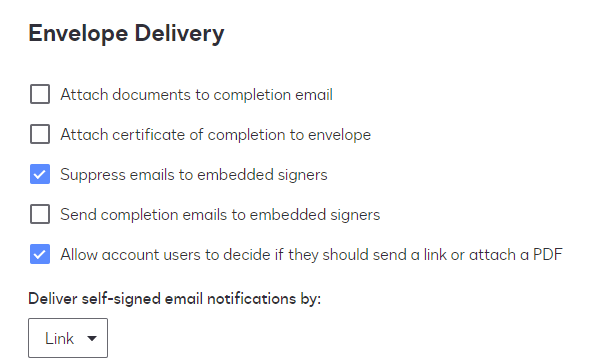
@gerber team - In the Signing Settings, you will see that option to make it default to your account: 

Check the “Attach certificate of completion to envelope” option.  The summary document is also called the Certificate of Completion.

2 replies

JohnSantos
Guru
Guru
June 7, 2024

@gerber team - In the Signing Settings, you will see that option to make it default to your account: 

Check the “Attach certificate of completion to envelope” option.  The summary document is also called the Certificate of Completion.

Welcome to the DocuSign Community! Your feedback is highly valued. If you find my response helpful, please give it a "Like" and consider marking it as the "Best Answer" to assist others with similar issues.
Docusign Employee
June 21, 2024

Hello @gerber team ,


If you found the provided response to be a useful solution to your question, please mark it as the best answer by clicking “Select as Best” to make it easier for other users to find.


Best regards,

Nathaly | Docusign Community Moderator
"Select as Best" below if you find the answer a valid solution to your issue!