Newcomer
April 5, 2024
Solved

Removing Envelope ID from document header

  • April 5, 2024
  • 2 replies
  • 1059 views

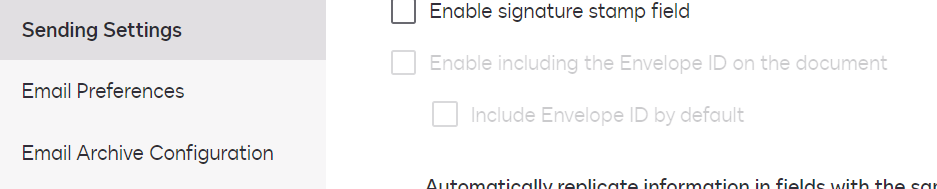
One of my team wants to remove the Envelope ID from the top of the documents we send out.  I see there is an option in Sending Settings called “Enable including the Envelope ID on the document” and “Include Envelope ID by default” but for me both of them are greyed out.  I have DS Admin access.  How do I enable these options?
 

Best answer by Michael.Rave

@Brent.Jarnell

When the feature is greyed out, please open a ticket with DocuSign Support to enable it on your DocuSign eSignature account.

This DocuSign Support Article contains more information on how to use the feature.

2 replies

Michael.Rave
Docusign Employee
Docusign Employee
April 5, 2024

@Brent.Jarnell

When the feature is greyed out, please open a ticket with DocuSign Support to enable it on your DocuSign eSignature account.

This DocuSign Support Article contains more information on how to use the feature.

"Select as Best" below if you find my answer is a valid solution to your issue and mark it as resolved.
Docusign Employee
April 19, 2024

Hi @Brent.Jarnell,


I hope you are doing well.


I would like to confirm if you were able to solve your issue by utilizing the solution that was suggested? 


If so, please mark it as the best answer by clicking “Select as Best” to make it easier for other users to find


Otherwise, feel free to let me know and I will gladly help you address the situation as soon as possible.


Best regards,   

Alejandro R. | DocuSign Community Moderator   

"Select as Best" below if you find the answer a valid solution to your issue!


