MatheusAlcantara
New Voice
New Voice
June 10, 2024
Solved

Revoke ocument generation permission from CLM Viewers

  • June 10, 2024
  • 2 replies
  • 81 views

We need to prevent users with the CLM Viewer license from accessing the document generation forms. Those forms are accessed thru the Actions Menu.

Best answer by Pawan Gangwani

Hello @MatheusAlcantara,

So you wanna restrict or we can say hide CLM viewers the generate the document option in the “Action Menu” right?
If yes then you have to follow 2 tasks.

1. Create the “Group” and add all the CLM viewers in the group.
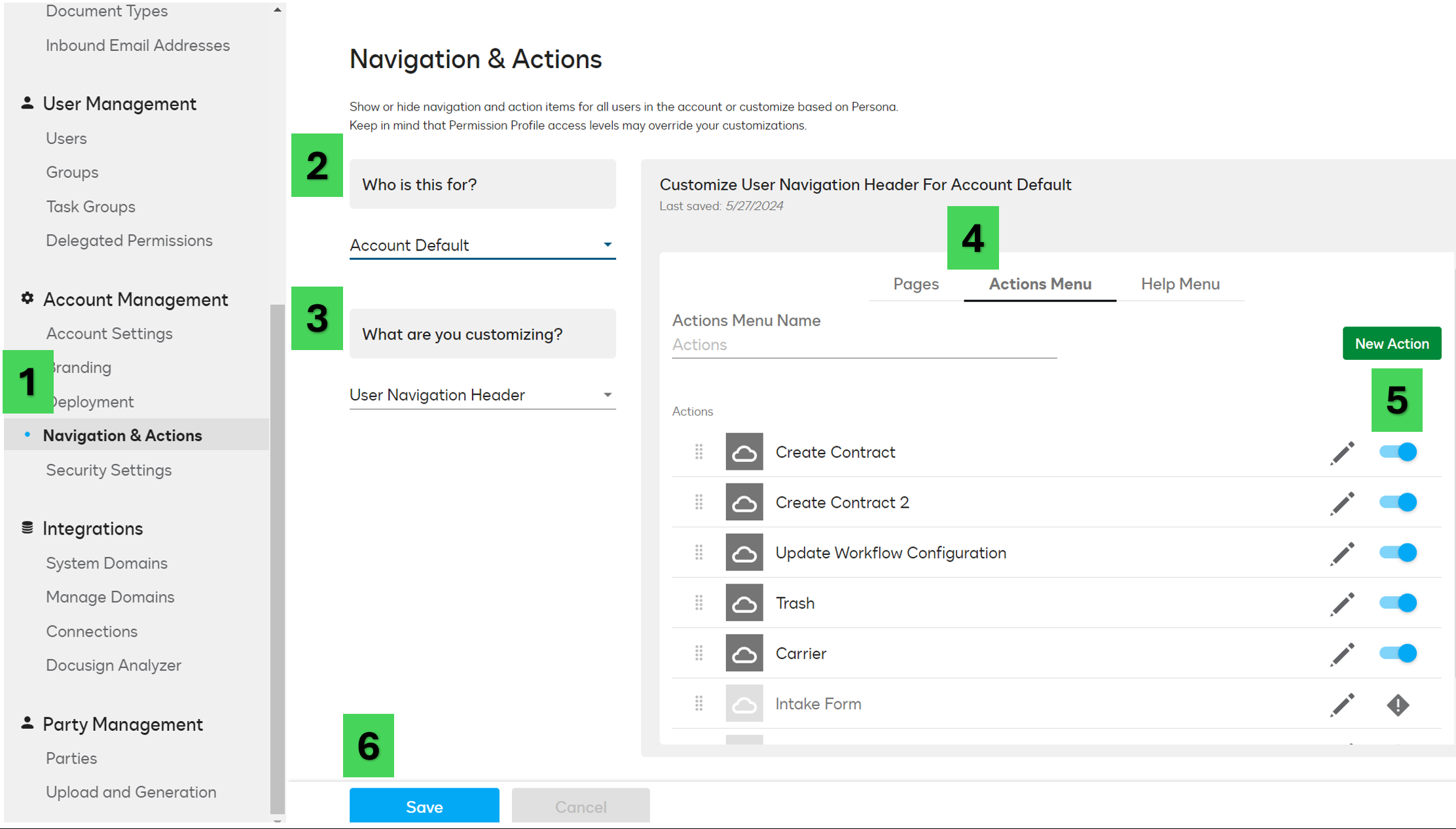
2. Go to the “Navigation & Action” in CLM admin.
   1, Select the group you created in “Who is this for?”
   2. select “User navigation Header” in “What Are you Customizing”
   3. Go to the “Action Menu” and turn off the button of configuration name.
   4. Click Save.

Attaching the Screenshot for the reference to follow the process.


Thanks! Mark it “BEST” if you find it right.

2 replies

MatheusAlcantara
New Voice
New Voice
June 10, 2024

The correct title would be Revoke document generation permission from CLM Viewers 🤦🏻

M. Alcantara
Pawan Gangwani
Hero
Hero
June 20, 2024

Hello @MatheusAlcantara,

So you wanna restrict or we can say hide CLM viewers the generate the document option in the “Action Menu” right?
If yes then you have to follow 2 tasks.

1. Create the “Group” and add all the CLM viewers in the group.
2. Go to the “Navigation & Action” in CLM admin.
   1, Select the group you created in “Who is this for?”
   2. select “User navigation Header” in “What Are you Customizing”
   3. Go to the “Action Menu” and turn off the button of configuration name.
   4. Click Save.

Attaching the Screenshot for the reference to follow the process.


Thanks! Mark it “BEST” if you find it right.

Way to Learn | I'd love your feedback | Hit Like | Mark it Best🌈