Newcomer
June 4, 2024
Solved

Two "Sign Here's" on Signature Field

  • June 4, 2024
  • 2 replies
  • 310 views

Hello, 


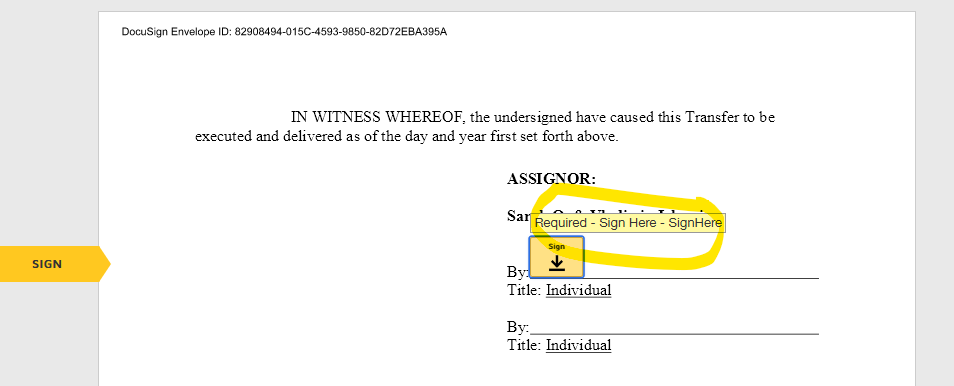
One of my recipients cannot finish signing the document as she gets through all of the fields and it sends her back to the top. I looked at her signature fields and saw some were duplicated and deleted the duplicates. However, when I preview, I see the below. Has anybody else had this issue and how did your resolve? I’ve deleted all duplicate signature fields.Thanks!



Best answer by JohnSantos

@Investor.Relations - It looks like you are in the right track.   Make sure when you correct the envelope you are removing all duplicate signature tags and any other fields that are assigned to the signer.   Must likely what have happened when you created the envelope is that a PDF with signature tags was uploaded and not deleted when DocuSign prompted you to do so.

2 replies

JohnSantos
Guru
Guru
June 4, 2024

@Investor.Relations - It looks like you are in the right track.   Make sure when you correct the envelope you are removing all duplicate signature tags and any other fields that are assigned to the signer.   Must likely what have happened when you created the envelope is that a PDF with signature tags was uploaded and not deleted when DocuSign prompted you to do so.

Welcome to the DocuSign Community! Your feedback is highly valued. If you find my response helpful, please give it a "Like" and consider marking it as the "Best Answer" to assist others with similar issues.
Docusign Employee
June 18, 2024

Hello @Investor.Relations ,


If you found the provided response to be a useful solution to your question, please mark it as the best answer by clicking “Select as Best” to make it easier for other users to find.


Best regards,

Nathaly | Docusign Community Moderator
"Select as Best" below if you find the answer a valid solution to your issue!

