New Voice
May 9, 2024
Solved

Saving and printing the email message sent to signers

  • May 9, 2024
  • 5 replies
  • 221 views

Hello,

I’d like to be able to save and print the messages sent to signers (whether that be the same message to multiple, or distinct messages to different people). Is that possible?
Thanks!

-Chris

Best answer by Alexandre.Augusto

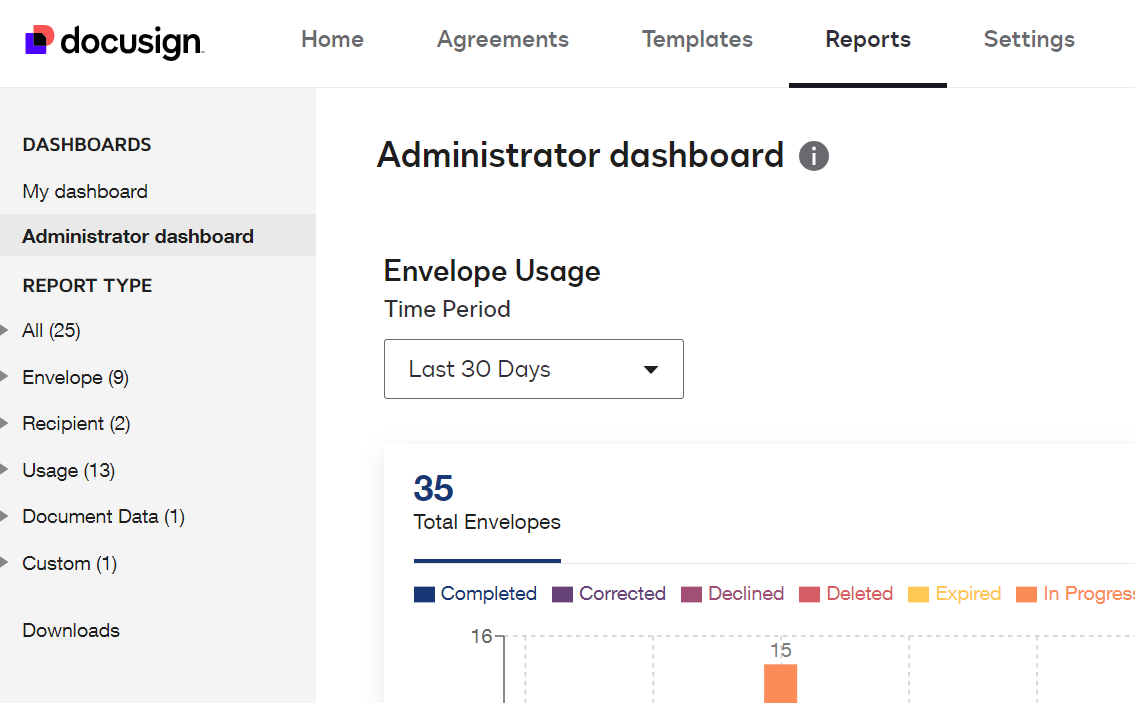
to get to the report page, click on Reports then on the left select the type of report to run


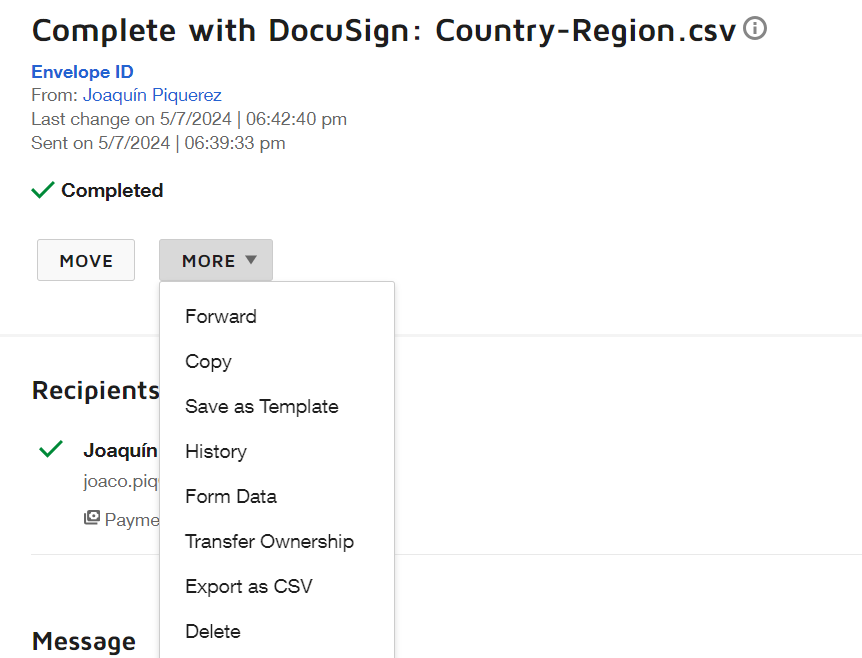
The message included in the Certification of Completion you can see those in the Envelopes’ History, select an envelope then click History


5 replies

Alexandre.Augusto
Docusign Employee
Docusign Employee
May 9, 2024

Hello, @cmagee 


You are welcome to the Docusign Community!


I’m not aware of any option to create a report like this using the web interface, maybe through APIs you could get that, but in this case you need someone is a Developer who knows how to use our APIs.


Perhaps, you could create a template with customized email messages (subject/body) for each recipient then always send an envelope using that template, so you’ll know in advance the emails messages sent. 


It’s possible add Private messages for each recipient. If you use this feature, there is an Envelope report where you can add a Private message column to see that private message. 


I hope that helps!


Best,

Alexandre

Your feedback is very appreciated! You can give a Like and mark this answer as the "Best Answer" for your issue. DocuSign University http://dsucustomers.docusign.com
cmageeNew VoiceAuthor
New Voice
May 9, 2024

The envelope report option might work for me. But how do I get to that? I’m not seeing that option in any of my completed envelopes. 

The template wouldn’t work because I’m wanting to do this not for convenience’s sake, but rather for record keeping.

Thanks!

-Chris

cmageeNew VoiceAuthor
New Voice
May 9, 2024

I wish the messages were included in the certificate/summary

Alexandre.Augusto
Docusign Employee
Docusign Employee
May 9, 2024

to get to the report page, click on Reports then on the left select the type of report to run


The message included in the Certification of Completion you can see those in the Envelopes’ History, select an envelope then click History


Your feedback is very appreciated! You can give a Like and mark this answer as the "Best Answer" for your issue. DocuSign University http://dsucustomers.docusign.com
Docusign Employee
May 23, 2024

Hi @cmagee,


I hope you are doing well.


I would like to confirm if you need further assistance, feel free to let me know and I will gladly help you address the situation as soon as possible.


Best regards,


Christopher | Docusign Community Moderator

"Select as Best" below if you find the answer a valid solution to your issue.