Newcomer
March 13, 2024
Solved

How do I remove checkbox groups

  • March 13, 2024
  • 2 replies
  • 341 views

I inadvertently created a checkbox group when I was trying to align a group of checkboxes in a template.  How do I remove the checkboxes from a group?

Best answer by Alexandre.Augusto

Hello, @ChristineR 


Welcome to the DocuSign Community!


If I understood well your question, you want do delete a checkbox inside of a Checkbox group? Right?

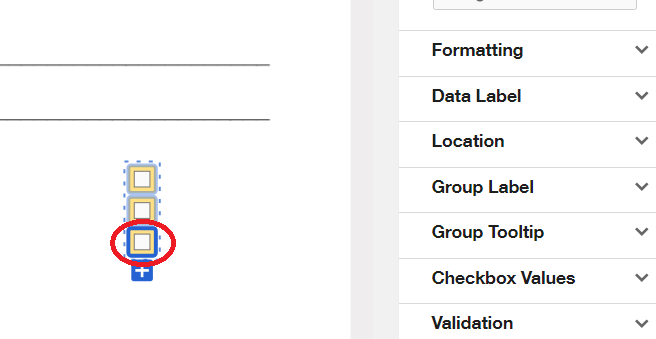
If so, just click in the individual checkbox, it will become blue then click Delete in your keyboard.

See the figure:

I hope that helps!

Best,

Alexandre 

2 replies

Alexandre.Augusto
Docusign Employee
Docusign Employee
March 13, 2024

Hello, @ChristineR 


Welcome to the DocuSign Community!


If I understood well your question, you want do delete a checkbox inside of a Checkbox group? Right?

If so, just click in the individual checkbox, it will become blue then click Delete in your keyboard.

See the figure:

I hope that helps!

Best,

Alexandre 

Your feedback is very appreciated! You can give a Like and mark this answer as the "Best Answer" for your issue. DocuSign University http://dsucustomers.docusign.com
Docusign Employee
March 28, 2024

Hi @ChristineR,


I hope you are doing well.


I would like to confirm if you were able to solve your issue by utilizing the solution that was suggested? 


If so, please mark it as the best answer by clicking “Select as Best” to make it easier for other users to find


Otherwise, feel free to let me know and I will gladly help you address the situation as soon as possible.


Best regards,   

Alejandro R. | DocuSign Community Moderator   

"Select as Best" below if you find the answer a valid solution to your issue!