New Voice
May 16, 2024
Solved

Envelope expiration settings

  • May 16, 2024
  • 4 replies
  • 539 views

I have a requirement for envelope expiration, 

  • The expiration date for the link is 30 days from the day it was sent to the recipient
  • The signatory will have 120 days to complete the workflow once it has been initiated (i.e once the link has been clicked on)

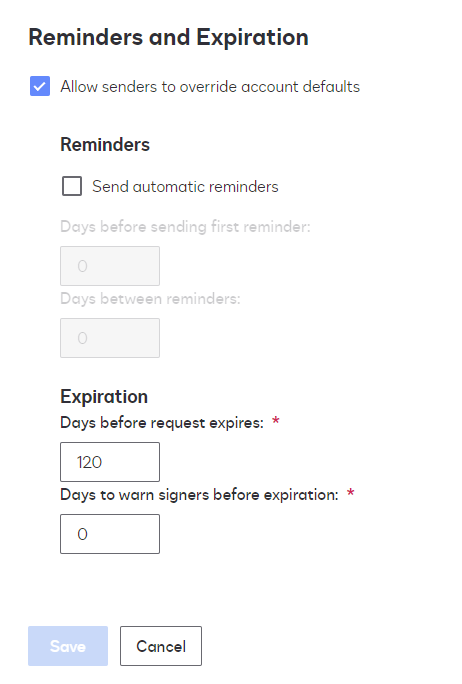
But I found only this under settings. is there a way to achieve both the requirements?
 

Best answer by Michael.Rave

@BGK

You can only specify an expiration date, which is X days after the envelope was sent.

It is not possible to have a different date for the link to expire and the transaction to expire. The expiration will always start when the envelope was sent and applies to the whole transaction, regardless of the number of signers that you specified.

4 replies

Michael.Rave
Docusign Employee
Docusign Employee
May 16, 2024

@BGK

You can only specify an expiration date, which is X days after the envelope was sent.

It is not possible to have a different date for the link to expire and the transaction to expire. The expiration will always start when the envelope was sent and applies to the whole transaction, regardless of the number of signers that you specified.

"Select as Best" below if you find my answer is a valid solution to your issue and mark it as resolved.
Alexandre.Augusto
Docusign Employee
Docusign Employee
May 16, 2024

Hello, @BGK 


You are welcome to the Docusign Community!


The Expiration Settings data is for the envelope, it’s mean regardless a signer clicks on a link to envelope or not, the envelope will expire anyway when the expire date arrives. 


I think the type of use case you need providing a link for review then expiring it regardless of the envelope expiration date settings can be achieved using Docusign CLM, however that is another product for the entire lifecycle of a contract. 


Another approach could be get a Developer who knows REST API then create a code to do what you want.


Let me know if I answered your question.


Best,

Alexandre

Your feedback is very appreciated! You can give a Like and mark this answer as the "Best Answer" for your issue. DocuSign University http://dsucustomers.docusign.com
BGKNew VoiceAuthor
New Voice
May 16, 2024

I was looking if there was any kind of settings for these options. I will try to explore options through REST API.

Docusign Employee
May 30, 2024

Hello @BGK ,


If you found the provided response to be a useful solution to your question, please mark it as the best answer by clicking “Select as Best” to make it easier for other users to find.


Best regards,

Nathaly | Docusign Community Moderator
"Select as Best" below if you find the answer a valid solution to your issue!



