Legacy User
May 16, 2023
Solved

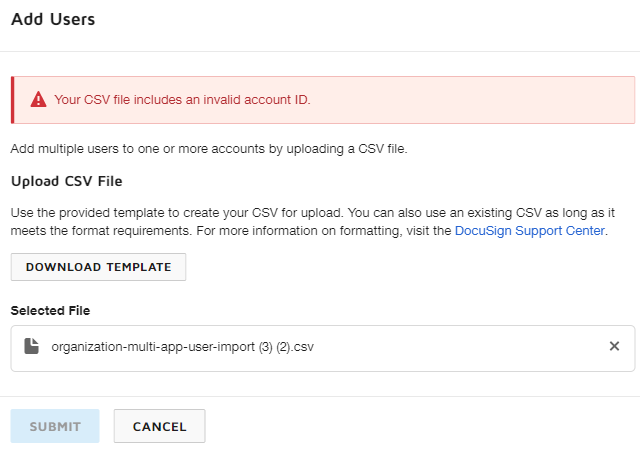
Bulk add of new users - what should I add as an account ID?

  • May 16, 2023
  • 4 replies
  • 102 views

I don't know what to add as an Account ID for a new user. Please see an error message belowimage

Best answer by Community Expert

Hello,

Thank you for reaching out here in the DocuSign Community.

The account ID you need to add to the user would be the account you want to add them to (in case there are several accounts) or just one account: https://support.docusign.com/s/document-item?bundleId=rrf1583359212854&topicId=emu1593207862708.html&_LANG=enus

The account ID can be found in several places, for example, you can find it under:

  1. DocuSign Admin (Organization Admin Tab)
  2. Accounts: https://support.docusign.com/s/document-item?bundleId=tku1629136038406&topicId=iol1583359169758.html&_LANG=enus

In the account itself (eSignature/eSign):

  1. Settings
  2. Plan and Billing: https://support.docusign.com/s/document-item?bundleId=pik1583277475390&topicId=uml1583277325331.html&_LANG=enus

Or on that same page, you can see it in the top left corner.

Let us know if you need further assistance with this.

Best regards,

Nathaly | DocuSign Community Moderator

"Select as Best" below if you find the answer a valid solution to your issue!

4 replies

Docusign Employee
May 16, 2023

Hello,

Thank you for reaching out here in the DocuSign Community.

The account ID you need to add to the user would be the account you want to add them to (in case there are several accounts) or just one account: https://support.docusign.com/s/document-item?bundleId=rrf1583359212854&topicId=emu1593207862708.html&_LANG=enus

The account ID can be found in several places, for example, you can find it under:

  1. DocuSign Admin (Organization Admin Tab)
  2. Accounts: https://support.docusign.com/s/document-item?bundleId=tku1629136038406&topicId=iol1583359169758.html&_LANG=enus

In the account itself (eSignature/eSign):

  1. Settings
  2. Plan and Billing: https://support.docusign.com/s/document-item?bundleId=pik1583277475390&topicId=uml1583277325331.html&_LANG=enus

Or on that same page, you can see it in the top left corner.

Let us know if you need further assistance with this.

Best regards,

Nathaly | DocuSign Community Moderator

"Select as Best" below if you find the answer a valid solution to your issue!

Legacy User
May 16, 2023

Thank you very much, you solved my problem

Legacy User
May 19, 2023

Hello, I have a similar problem with CLM and DocuSign edits. What type of Account ID should I add here? Adding the Account ID that I used for the previous task doesn't work. image

Legacy User
May 19, 2023

Hello,

Thank you for reaching out here in the DocuSign Community.

Are you entering the account ID of the account that has CLM enabled on it?

Let us know if you need further assistance with this.

Best regards,

Nathaly | DocuSign Community Moderator

"Select as Best" below if you find the answer a valid solution to your issue!