New Voice
April 18, 2024
Solved

Push document updates/redlines back into Salesforce

  • April 18, 2024
  • 7 replies
  • 294 views

Is the following possible with DocuSign CLM?


A document is generated with merged values from a record in Salesforce. The document is then reviewed internally and sent externally for review and redlines. When the parties agree that the document is finalized, we’d like to update the original Salesforce record with the new values that are in the document’s merged fields. Is this possible? If so, I would very much appreciate a summary of how one would go about it. Thanks in advance!

Best answer by Michael.Rave

@kcampbell

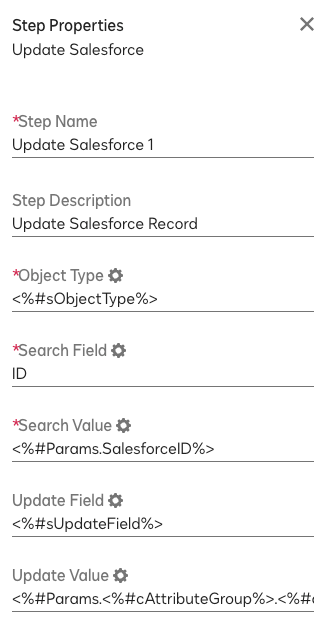
Sure, let me post a screenshot of an actual configuration of that step, which may help you with the configuration:

This examples is based off a document generation triggered from Salesforce, which means the Salesforce Object Type and the Record ID are part of the payload and can be leverages in the workflow to update Salesforce at a later point in the workflow.

Object Type: Salesforce Object Type, e.g. Opportunity

Search Field: ID

Search Value: Salesforce Record ID, e.g. Opportunity ID (need to match Object Type)

Update Field: Salesforce Field Name

Update Value: New Value, stored in a CLM Variable or hard coded into the step

7 replies

Michael.Rave
Docusign Employee
Docusign Employee
April 19, 2024

@kcampbell 

Yes, this is possible and commonly uses. Within a CLM workflow there is a step “Update Salesforce”, which can be used to update field values in Salesforce.com from Docusign CLM variables.

"Select as Best" below if you find my answer is a valid solution to your issue and mark it as resolved.
kcampbellNew VoiceAuthor
New Voice
April 19, 2024

@Michael.Rave Thank you for your response—I really appreciate it. I am aware of the element but am struggling to find documentation on how to use it effectively. Do you mind sharing additional details as to how to use that element to pass an updated value from a document back into the corresponding Salesforce field?

Michael.Rave
Docusign Employee
Docusign Employee
April 19, 2024

@kcampbell

Sure, let me post a screenshot of an actual configuration of that step, which may help you with the configuration:

This examples is based off a document generation triggered from Salesforce, which means the Salesforce Object Type and the Record ID are part of the payload and can be leverages in the workflow to update Salesforce at a later point in the workflow.

Object Type: Salesforce Object Type, e.g. Opportunity

Search Field: ID

Search Value: Salesforce Record ID, e.g. Opportunity ID (need to match Object Type)

Update Field: Salesforce Field Name

Update Value: New Value, stored in a CLM Variable or hard coded into the step

"Select as Best" below if you find my answer is a valid solution to your issue and mark it as resolved.
Justin Jiang
Established Contributor
April 25, 2024

Very cool!

Welcome to the DocuSign Community and University! Your feedback is immensely appreciated. If this answer resolves your issue, please feel free to give it a Like and mark it as the "Best Answer". This helps others in the community find the information they need. Visit us at http://dsucustomers.docusign.com for more resources and support.
Conversation Starter
December 2, 2024

@Michael.Rave, thank you for providing the details of the above scenario. I have the similar one where I need to update the salesforce field data where it is not available in the template merge field ex: Opportunity Stage. Is that possible?

Michael.Rave
Docusign Employee
Docusign Employee
December 2, 2024

@animish36 

Sure, you can update the Opportunity Stage without any problem. Just input the correct Salesforce Field name and the value you want to set it to, e.g. “Closed Won”.

"Select as Best" below if you find my answer is a valid solution to your issue and mark it as resolved.
Conversation Starter
December 2, 2024

@Michael.Rave 

I tried to modify the Opportunity Name for the moment and I configured the step as below. Please let me know if I am missing anything.


