Solved

CLM Workflow Wait for Signature step reminder

  • January 10, 2025
  • 4 replies
  • 207 views

extol7
Active Voice
Forum|alt.badge.img+2

Where can I find documentation for CLM Workflow Steps?

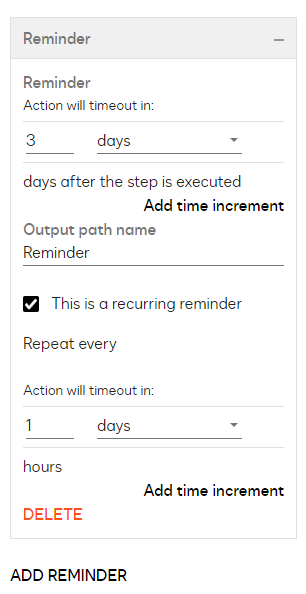
I am trying to set a reminder on an Wait for Signature step and I am confused on the settings.

Below,

Does this mean that the wait for user to sign will terminate in 3 days, but a reminder will go out every 1 day?



Best answer by JohnSantos

@extol7 

Yes—if you configure the “Wait for Signature” step to expire in 3 days and set a 1-day reminder frequency, the workflow will automatically terminate if the signature isn’t received within 3 days, and the system will send a reminder notification each day until either the document is signed or the 3-day window expires.

Docusign CLM Administration Overview

4 replies

JohnSantos
Guru
Forum|alt.badge.img+21
  • Guru
  • Answer
  • January 10, 2025

@extol7 

Yes—if you configure the “Wait for Signature” step to expire in 3 days and set a 1-day reminder frequency, the workflow will automatically terminate if the signature isn’t received within 3 days, and the system will send a reminder notification each day until either the document is signed or the 3-day window expires.

Docusign CLM Administration Overview


extol7
Active Voice
Forum|alt.badge.img+2
  • Author
  • Active Voice
  • January 24, 2025

So, after testing with the above settings [Reminder Action will time out in 3 days] & [daily reminder every one day], , it seems the wait for signature step waits 3 days, then sends out a reminder every day.  but so far the step/workflow is not timing out.   This is a bit misleading. There is a connection named Time Out to add an email or more steps after the timeout, but I cannot find the ‘terminate after x days’ setting in the Wait for Signature step.


Forum|alt.badge.img+1
  • New Voice
  • June 3, 2026

I am having this same issue.  The reminders on the Wait for Signature steps (and the Wait for External Review steps) are different than the reminders on other steps such as Choice Steps or Approve Steps.  The Choice and Approve steps have a dedicated Due Date section where the document truly times out and exits the workflow, plus an additional Reminders section where you can send alerts.  But the Wait for Signature step and Wait for External Review steps just have a ‘Reminders’ section whose prompt gives the impression that you are setting a timeout, when really you’re setting reminders.  Is this because once the document leaves DocuSign, you can’t truly time it out?


DC3IT
Active Voice
Forum|alt.badge.img+2
  • Active Voice
  • June 8, 2026

@extol7 when you configure the Reminder you can set the “Output Path Name”. Then you will want to create a new connector to the desired step and select the name you entered for the Output Path Name. For the timed out default choice for a connector that is part of the default settings for the envelope which is 120 days I believe. The Reminder allows you to override that without the need to modify default settings and provides the ability to be more dynamic depending on the paper type being sent - for example MSA 10 days vs NDA 5 days, etc.

@joliver you draw a solid distinction, but I think the issue is partly because of the difference between internal human steps and external human steps, and more likely due to the nature that the wait step is a secondary step to the main human step of Review and Send for [Signature or External Review]. With that said, it is confusing as to why the UI/UX design is different as well as the somewhat “hidden” Output Path Name which amounts to the connector name you want to use when the condition is triggered.