May 2, 2024
Solved

This Account lacks sufficient permissions to use Merge Fields.' in Salesforce DocuSign Apps Launcher?

  • May 2, 2024
  • 3 replies
  • 195 views

Is there way to resolve this without raising case.

I am unable to raise case with the trial version.

Best answer by Michael.Rave

@KoutilyaTej

I don’t think the Docusign eSignature trial account has Salesforce.com enabled as a feature.

However, you can create a free Docusign developer account here on the top right:
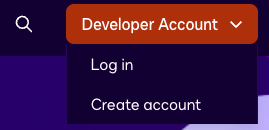
You should be able to connect it to Salesforce.com environment without problems and do the desired testing with Docusign Apps Launcher.

3 replies

Michael.Rave
Docusign Employee
Docusign Employee
May 2, 2024

@KoutilyaTej

I don’t think the Docusign eSignature trial account has Salesforce.com enabled as a feature.

However, you can create a free Docusign developer account here on the top right:

You should be able to connect it to Salesforce.com environment without problems and do the desired testing with Docusign Apps Launcher.

"Select as Best" below if you find my answer is a valid solution to your issue and mark it as resolved.
May 2, 2024

@Michael.Rave :  Still i am not able to create a case with this account

Michael.Rave
Docusign Employee
Docusign Employee
May 2, 2024

@KoutilyaTej

Were you able to connect it to your Salesforce.com environment and use merge fields?

No, you cannot create a support ticket with a free developer account either, but it shouldn’t be necessary, as you are able to test the functionality without them enabling it.


"Select as Best" below if you find my answer is a valid solution to your issue and mark it as resolved.

