You want to put a today’s date field indicating that’s the date of the document was generated, I assume you’re saying the date of the document was uploaded to the envelope to be sent.
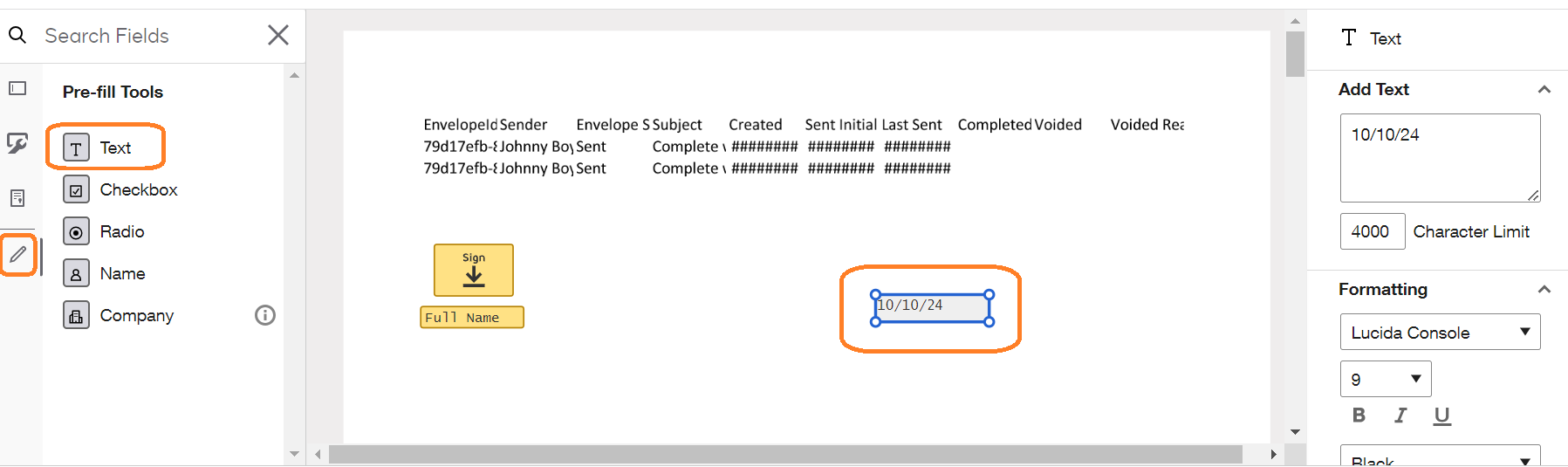
As a Sender, after add the document, and recipients, you can add in the document a tag from the Pre-Fill tools.
Add a pre-fill Text tag
Type the today’s date, of course you need to pay attention to type the correct date. (the only field with current date is the Signed Date field, so this would be a workaround)
This tag cannot be changed by the recipients, so when they access the envelope, that date will be seen by them.
See the figure.
I hope that helps!
Alexandre
Your feedback is very appreciated! You can give a Like and mark this answer as the "Best Answer" for your issue. DocuSign University http://dsucustomers.docusign.com
You want to put a today’s date field indicating that’s the date of the document was generated, I assume you’re saying the date of the document was uploaded to the envelope to be sent.
As a Sender, after add the document, and recipients, you can add in the document a tag from the Pre-Fill tools.
Add a pre-fill Text tag
Type the today’s date, of course you need to pay attention to type the correct date. (the only field with current date is the Signed Date field, so this would be a workaround)
This tag cannot be changed by the recipients, so when they access the envelope, that date will be seen by them.
See the figure.
I hope that helps!
Alexandre
Translate
Your feedback is very appreciated! You can give a Like and mark this answer as the "Best Answer" for your issue. DocuSign University http://dsucustomers.docusign.com
If you found the provided response to be a useful solution to your question, please mark it as the best answer by clicking “Select as Best” to make it easier for other users to find.
Best regards,
Nathaly | Docusign Community Moderator "Select as Best" below if you find the answer a valid solution to your issue!
Integration with third-party business systems can be more flexible.
Translate
Welcome to the DocuSign Community! Your feedback is highly valued. If you find my response helpful, please give it a "Like" and consider marking it as the "Best Answer" to assist others with similar issues.
You can login or register as either a Docusign customer or developer. If you don’t already have a Docusign customer or developer account, you can create one for free when registering.
You can login or register as either a Docusign customer or developer. If you don’t already have a Docusign customer or developer account, you can create one for free when registering.
 Back to Docusign.com