Newcomer
May 14, 2024
Solved

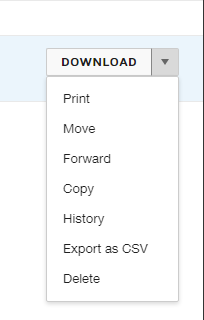
save as template does not appear as an option

  • May 14, 2024
  • 2 replies
  • 576 views

The save as template does not appear as an option for me.


Best answer by Alexandre.Augusto

Hello, @Robinson Bradshaw 


You are welcome to the Docusign Community!


By default, an user with DS Sender permissions can use a template, but cannot create one so saving as a template will not be available.


Ask to your eSignature Admin to create a customized Permission Profile for a DS Sender with Template’s creation permissions then add your user on this new Permission Profile.


Let me know if I answered your question!


Best,

Alexandre

2 replies

Alexandre.Augusto
Docusign Employee
Docusign Employee
May 14, 2024

Hello, @Robinson Bradshaw 


You are welcome to the Docusign Community!


By default, an user with DS Sender permissions can use a template, but cannot create one so saving as a template will not be available.


Ask to your eSignature Admin to create a customized Permission Profile for a DS Sender with Template’s creation permissions then add your user on this new Permission Profile.


Let me know if I answered your question!


Best,

Alexandre

Your feedback is very appreciated! You can give a Like and mark this answer as the "Best Answer" for your issue. DocuSign University http://dsucustomers.docusign.com
Docusign Employee
May 28, 2024

Hello @Robinson Bradshaw ,


If you found the provided response to be a useful solution to your question, please mark it as the best answer by clicking “Select as Best” to make it easier for other users to find.


Best regards,

Nathaly | Docusign Community Moderator
"Select as Best" below if you find the answer a valid solution to your issue!