Newcomer
May 15, 2024
Solved

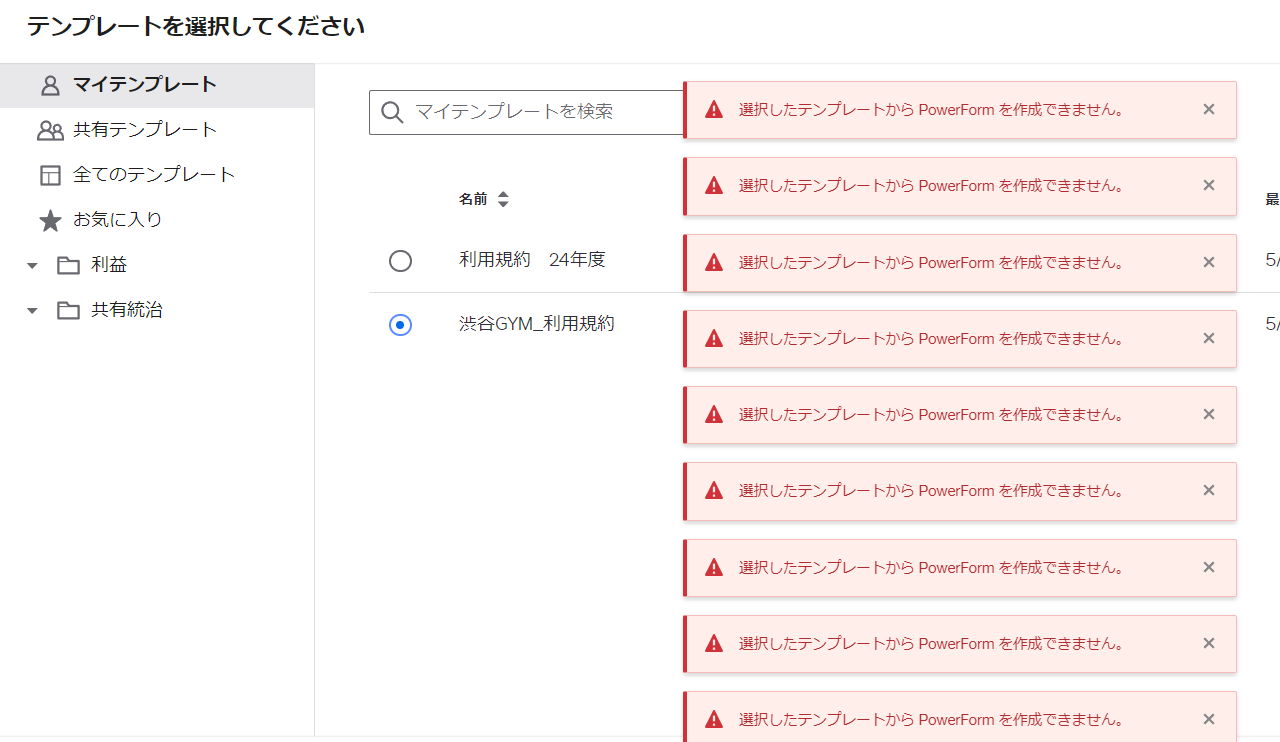
Power form cannot be created from template

  • May 15, 2024
  • 2 replies
  • 957 views

When I try to create a power form from a template, I get an error that doesn't explain the reason and I can't use it.

 

Best answer by Michael.Rave

@hihara 

This Docusign Support article has limitations related to PowerForms.

PowerForm limitations:

  • Requires a Business Pro plan
  • To create a PowerForm, you must have PowerForm administrator permissions.
  • A PowerForm is initiated from the PowerForm URL by the first recipient in the signing order; other recipients must initiate signing from an email notification.
  • The Sign in Person recipient action is not supported with PowerForms because the Signing Host must have an account and the signer may not have an existing Docusign account.
  • Collaborative Fields are not recommended. Collaborative fields allow signers to negotiate changes with one another. If your PowerForm is distributed without requiring email validation, collaborative fields that require changes to be approved by all signers will not work.
  • Document Visibility is unsupported

2 replies

Michael.Rave
Docusign Employee
Docusign Employee
May 15, 2024

@hihara 

This Docusign Support article has limitations related to PowerForms.

PowerForm limitations:

  • Requires a Business Pro plan
  • To create a PowerForm, you must have PowerForm administrator permissions.
  • A PowerForm is initiated from the PowerForm URL by the first recipient in the signing order; other recipients must initiate signing from an email notification.
  • The Sign in Person recipient action is not supported with PowerForms because the Signing Host must have an account and the signer may not have an existing Docusign account.
  • Collaborative Fields are not recommended. Collaborative fields allow signers to negotiate changes with one another. If your PowerForm is distributed without requiring email validation, collaborative fields that require changes to be approved by all signers will not work.
  • Document Visibility is unsupported
"Select as Best" below if you find my answer is a valid solution to your issue and mark it as resolved.
Docusign Employee
May 30, 2024

Hi @hihara,


I hope you are doing well.


I would like to confirm if you need further assistance, feel free to let me know and I will gladly help you address the situation as soon as possible.


Best regards,


Christopher | Docusign Community Moderator

"Select as Best" below if you find the answer a valid solution to your issue

