New Voice
May 29, 2024
Solved

I want to change signature on a document sent to me .

  • May 29, 2024
  • 6 replies
  • 152 views

I received a document by email and signed it, but did not send it. I want to change my signature but I can't, can you help me please

Best answer by JohnSantos

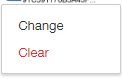
@zouay  -  If you have not sent it, you might still be able to change your signature.  You can click on your signature and It will give you the option to “Change” or “Clear”.   


6 replies

JohnSantos
Guru
Guru
May 29, 2024

@zouay  -  If you have not sent it, you might still be able to change your signature.  You can click on your signature and It will give you the option to “Change” or “Clear”.   


Welcome to the DocuSign Community! Your feedback is highly valued. If you find my response helpful, please give it a "Like" and consider marking it as the "Best Answer" to assist others with similar issues.
zouayNew VoiceAuthor
New Voice
May 29, 2024

i dont have this option, it is either sign or the signature that i want to change 


JohnSantos
Guru
Guru
May 29, 2024

@zouay - Do you have a DocuSign account?  The sender might have blocked changes for recipients.  

Welcome to the DocuSign Community! Your feedback is highly valued. If you find my response helpful, please give it a "Like" and consider marking it as the "Best Answer" to assist others with similar issues.
zouayNew VoiceAuthor
New Voice
May 29, 2024

I created the account after encountering this problem

JohnSantos
Guru
Guru
May 29, 2024

@zouay - I don’t think the envelope will be in your DocuSign inbox.  Can you ask the sender to resend the envelope?   Have you tried to change your Signature from your profile in your newly created DocuSign account?

Welcome to the DocuSign Community! Your feedback is highly valued. If you find my response helpful, please give it a "Like" and consider marking it as the "Best Answer" to assist others with similar issues.
Docusign Employee
June 12, 2024

Hello @zouay ,


If you found the provided response to be a useful solution to your question, please mark it as the best answer by clicking “Select as Best” to make it easier for other users to find.


Best regards,

Nathaly | Docusign Community Moderator
"Select as Best" below if you find the answer a valid solution to your issue!