New Voice
April 15, 2024
Solved

Envelope ID Stamp Control is supported by Business Pro For Salesforce?

  • April 15, 2024
  • 3 replies
  • 115 views

Hi, 

I’m been trying to find a solution to remove or replace the envelope Id from my templates. I found that it is possible with the Envelope Id Stamp Control, but I want to know if it is available for Business Pro For Salesforce?

Best answer by Alexandre.Augusto

Hello, @vanesys 


Welcome to the Docusign Community!


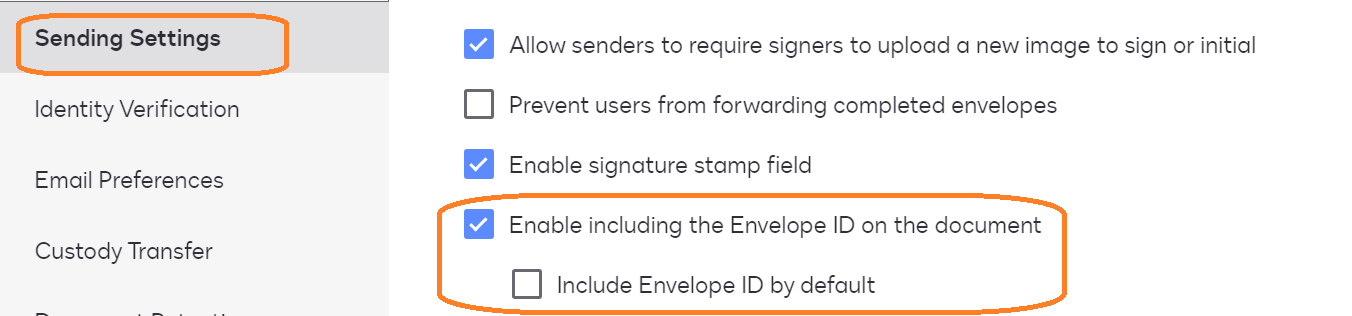
Go to your Settings page, verify if you have the options below in the Sending Settings:


Now, with this setting enable you can place it where you would like.
See this article:
https://support.docusign.com/s/document-item?language=en_US&bundleId=gbo1643332197980&topicId=iuo1578456366911.html&_LANG=enus


If you don’t see that setting in your account, contact our Support team to help you with this request.


Best,

Alexandre

3 replies

Alexandre.Augusto
Docusign Employee
Docusign Employee
April 15, 2024

Hello, @vanesys 


Welcome to the Docusign Community!


Go to your Settings page, verify if you have the options below in the Sending Settings:


Now, with this setting enable you can place it where you would like.
See this article:
https://support.docusign.com/s/document-item?language=en_US&bundleId=gbo1643332197980&topicId=iuo1578456366911.html&_LANG=enus


If you don’t see that setting in your account, contact our Support team to help you with this request.


Best,

Alexandre

Your feedback is very appreciated! You can give a Like and mark this answer as the "Best Answer" for your issue. DocuSign University http://dsucustomers.docusign.com
Derrick.Tran
Docusign Employee
Docusign Employee
April 15, 2024

Hello @vanesys,


In addition to @Alexandre.Augusto response, this setting would not retroactively update existing templates with this setting. You would have to update each template individually with the following Step.

Docusign Employee
April 29, 2024

Hi @vanesys,


I hope you are doing well.


I would like to confirm if you were able to solve your issue by utilizing the solution that was suggested? 


If so, please mark it as the best answer by clicking “Select as Best” to make it easier for other users to find


Otherwise, feel free to let me know and I will gladly help you address the situation as soon as possible.


Best regards,   

Alejandro R. | DocuSign Community Moderator   

"Select as Best" below if you find the answer a valid solution to your issue!